

The DOI matches its Crossref record; 72 of the 72 references it cites were found in a registry or an index; 2 of the 61 sources its claims cite were checked for support.
Luminate: Structured Generation and Exploration of Design Space with Large Language Models for Human-AI Co-Creation
Open accessAbstract
Thanks to their generative capabilities, large language models (LLMs) have become an invaluable tool for creative processes. These models have the capacity to produce hundreds and thousands of visual and textual outputs, offering abundant inspiration for creative endeavors. But are we harnessing their full potential? We argue that current interaction paradigms fall short, guiding users towards rapid convergence on a limited set of ideas, rather than empowering them to explore the vast latent design space in generative models. To address this limitation, we propose a framework that facilitates the structured generation of design space in which users can seamlessly explore, evaluate, and synthesize a multitude of responses. We demonstrate the feasibility and usefulness of this framework through the design and development of an interactive system, Luminate, and a user study with 14 professional writers. Our work advances how we interact with LLMs for creative tasks, introducing a way to harness the creative potential of LLMs.
Overview
AI snapshot
Written from the paper’s full text.
TL;DR
The paper proposes “Prompting for Design Space,” a framework that has LLMs first generate relevant dimensions and then dimension-guided responses so users can explore a structured design space rather than converge on a single output. It instantiates this as Luminate and reports a study with 14 professional writers, finding high creativity support (CSI 82.16) and perceived benefits for divergent thinking and design-space understanding.
Key findings
- Luminate received an overall Creativity Support Index score of 82.16 (SD = 5.14), with strongest support for Exploration (M = 18.21, SD = 1.76), which participants also rated the most important factor (Avg. Factor Count = 4).
- In the 25-minute study task, participants prompted on average 4.3 times (SD = 3.9, range = [1, 15]) and explored 13.8 responses (SD = 7.6, range = [4, 26]); all reported that multiple options from one prompt benefited brainstorming/ideation, and the tool scored 9/10 (SD = 1.1) on tracking different ideas and exploring many ideas/options/outcomes.
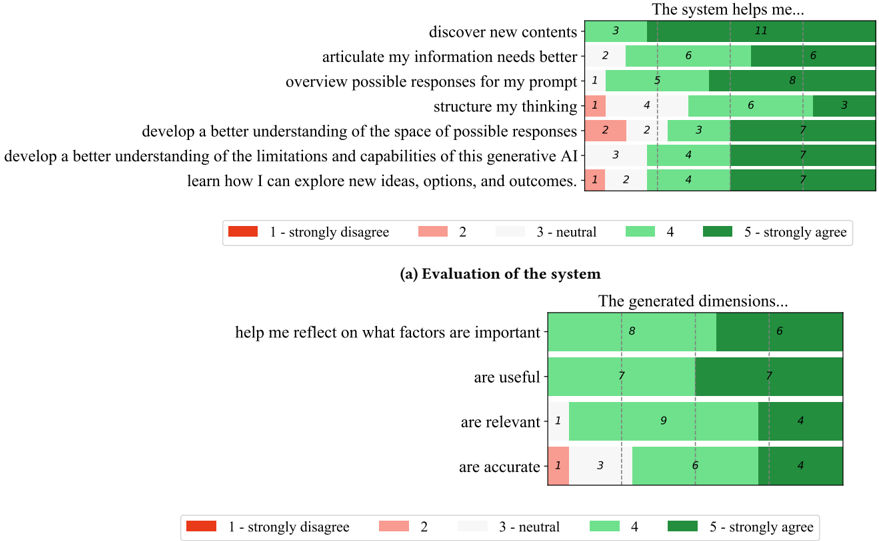
- All participants agreed generated dimensions helped them reflect on important task/topic factors (6 Strongly Agree, 8 Agree); dimensions were rated accurate (4 Strongly Agree, 6 Agree, 3 Neutral, 1 Disagree), useful (7 Strongly Agree, 7 Agree), and relevant (4 Strongly Agree, 9 Agree, 1 Neutral).
- In a follow-up in-the-wild study, 8 participants used Luminate for about 2 weeks and still preferred it for brainstorming and creative tasks; in the initial study, 10/14 preferred Luminate for creative writing.
Methods
- The authors designed and developed Luminate using React, Editor.js, and d3.js, with OpenAI’s text-davinci-003 API. The pipeline first prompts the LLM to generate categorical (ordinal and nominal) dimensions and values, then randomly selects one value per dimension to form requirements and generates responses in parallel.
- A user study recruited 14 professional writers (9F, 5M; M age = 30, SD = 7.7; M writing experience = 7.3 years, SD = 8.4) via Upwork. The 80-minute online study included a pre-study survey, 25-minute interface tutorial, 25-minute creative writing task, and post-study survey plus exit interview. Luminate was configured for up to 5 nominal dimensions with up to 8 labels and up to 3 ordinal dimensions with 5 levels; responses were limited to 150 words and 40 responses per prompt.
- Analysis combined Creativity Support Index scores, survey ratings, interaction logs, think-aloud observations, and semi-structured interviews, followed by an in-the-wild study with 8 participants over about 2 weeks.
Limitations
- Stated in the paper: the study fixed response length at 150 words and response count at 40, which may have affected perceived value; it lacked testing with diverse user groups such as non-professional writers; and it lacked rigorous comparison with existing AI tools, relying instead on participants’ self-reported comparison with ChatGPT.
- Evident from the text: the controlled study involved limited exposure (25–50 minutes), and some participants found 40 responses overwhelming or suggested fewer/simpler initial outputs; dimension quality also varied, with examples such as “creativity” appearing as an ordinal dimension and “gender” as a nominal dimension that one user did not find useful.
Model-written summary. Check it against the paper before relying on it.
Integrity signals
Registry
Cites
Statistics
Figures
Verification
Claims the paper makes
72 Own result · 41 Own interpretation · 32 Not checked yet · 6 Own method · 2 No basis given · 1 Supported so far · 1 Sources not found
A result the paper reports from its own data — it cites no other source for it, so there is none to check. The quote shows it is in the paper.
In the paper
“All participants agreed that the exploration view in Luminate was also important in helping them achieve a comprehensive understanding of the design space (7 Strongly Agree, 7 Agree).”
plaindirect- Asserted: passes — The authors put it forward as true.
- Checkable: passes — It can be checked against evidence.
- Load-bearing: passes — The paper’s conclusions depend on it.
- Based: passes — The paper gives a reason why it holds.
A result the paper reports from its own data — it cites no other source for it, so there is none to check. The quote shows it is in the paper.
In the paper
“Moreover, it reminded them of aspects of the task they had never thought about.”
plaindirect- Asserted: passes — The authors put it forward as true.
- Checkable: passes — It can be checked against evidence.
- Load-bearing: passes — The paper’s conclusions depend on it.
- Based: passes — The paper gives a reason why it holds.
A result the paper reports from its own data — it cites no other source for it, so there is none to check. The quote shows it is in the paper.
In the paper
“P8, who called himself 'a slow learner' and needs 'maybe a week' to play around with it to understand its usefulness, noted after a week of use in the wild that he finds it useful”
plainSingle case- Asserted: passes — The authors put it forward as true.
- Checkable: passes — It can be checked against evidence.
- Load-bearing: unclear — It is unclear whether the paper’s conclusions depend on it.
- Based: passes — The paper gives a reason why it holds.
A result the paper reports from its own data — it cites no other source for it, so there is none to check. The quote shows it is in the paper.
In the paper
“Most participants employed a chaining of prompts, whereby they progressively refined their creative output by iterating through prompts and responses.”
plain- Asserted: passes — The authors put it forward as true.
- Checkable: passes — It can be checked against evidence.
- Load-bearing: unclear — It is unclear whether the paper’s conclusions depend on it.
- Based: passes — The paper gives a reason why it holds.
A result the paper reports from its own data — it cites no other source for it, so there is none to check. The quote shows it is in the paper.
In the paper
“Participants also agreed that using Luminate ingrained in them a sense that they can now foresee possible response space of their prompts (8 Strongly Agree, 5 Agree, 1 Neutral).”
plaindirect- Asserted: passes — The authors put it forward as true.
- Checkable: passes — It can be checked against evidence.
- Load-bearing: passes — The paper’s conclusions depend on it.
- Based: passes — The paper gives a reason why it holds.
A result the paper reports from its own data — it cites no other source for it, so there is none to check. The quote shows it is in the paper.
In the paper
“We exclude numerical dimensions such as word length , as our testing and pilot studies showed they do not deliver meaningful interactions and benefits.”
plain- Asserted: passes — The authors put it forward as true.
- Checkable: passes — It can be checked against evidence.
- Load-bearing: passes — The paper’s conclusions depend on it.
- Based: passes — The paper gives a reason why it holds.
A result the paper reports from its own data — it cites no other source for it, so there is none to check. The quote shows it is in the paper.
In the paper
“As shown in Fig. 12a, all the participants also agreed that the system helped discover new content (11 Strongly Agree, 3 Agree).”
plain- Asserted: passes — The authors put it forward as true.
- Checkable: passes — It can be checked against evidence.
- Load-bearing: passes — The paper’s conclusions depend on it.
- Based: passes — The paper gives a reason why it holds.
A result the paper reports from its own data — it cites no other source for it, so there is none to check. The quote shows it is in the paper.
In the paper
“Our user study with 14 professional writers specializing in creative writing shows that our approach has the potential to help users effectively explore the design space during their creative processes.”
hedgedconditional- Asserted: passes — The authors put it forward as true.
- Checkable: passes — It can be checked against evidence.
- Load-bearing: passes — The paper’s conclusions depend on it.
- Based: passes — The paper gives a reason why it holds.
A result the paper reports from its own data — it cites no other source for it, so there is none to check. The quote shows it is in the paper.
In the paper
“All participants found that our approach, especially the generated dimensions, helped them reflect on what factors are important for their task and topic (6 Strongly Agree, 8 Agree).”
plaindirect- Asserted: passes — The authors put it forward as true.
- Checkable: passes — It can be checked against evidence.
- Load-bearing: passes — The paper’s conclusions depend on it.
- Based: passes — The paper gives a reason why it holds.
A result the paper reports from its own data — it cites no other source for it, so there is none to check. The quote shows it is in the paper.
In the paper
“Participants mostly found the generated dimensions to be accurate (4 Strongly Agree, 6 Agree, 3 Neutral, 1 Disagree)”
plain- Asserted: passes — The authors put it forward as true.
- Checkable: passes — It can be checked against evidence.
- Load-bearing: passes — The paper’s conclusions depend on it.
- Based: passes — The paper gives a reason why it holds.
A result the paper reports from its own data — it cites no other source for it, so there is none to check. The quote shows it is in the paper.
In the paper
“but also for exploring the space of possible responses (7 Strongly Agree, 5 Agree, 1 Neutral, 1 Disagree).”
plain- Asserted: passes — The authors put it forward as true.
- Checkable: passes — It can be checked against evidence.
- Load-bearing: passes — The paper’s conclusions depend on it.
- Based: passes — The paper gives a reason why it holds.
A result the paper reports from its own data — it cites no other source for it, so there is none to check. The quote shows it is in the paper.
In the paper
“All the participants reported that having multiple options from one prompt was beneficial for the brainstorming and ideation stage of creative writing.”
plain- Asserted: passes — The authors put it forward as true.
- Checkable: passes — It can be checked against evidence.
- Load-bearing: passes — The paper’s conclusions depend on it.
- Based: passes — The paper gives a reason why it holds.
A result the paper reports from its own data — it cites no other source for it, so there is none to check. The quote shows it is in the paper.
In the paper
“several found 40 responses overwhelming”
- Also stated in: § 7.2 Future Work · p. 16 · plain
“some participants found the multitude of outputs overwhelming”
plain- Asserted: passes — The authors put it forward as true.
- Checkable: passes — It can be checked against evidence.
- Load-bearing: passes — The paper’s conclusions depend on it.
- Based: passes — The paper gives a reason why it holds.
- Also stated in: § 7.2 Future Work · p. 16 · plain
A result the paper reports from its own data — it cites no other source for it, so there is none to check. The quote shows it is in the paper.
In the paper
“Most participants found that Luminate helped them structure their thinking around the design space (3 Strongly Agree, 6 Agree, 4 Neutral, 1 Disagree).”
plain- Asserted: passes — The authors put it forward as true.
- Checkable: passes — It can be checked against evidence.
- Load-bearing: passes — The paper’s conclusions depend on it.
- Based: passes — The paper gives a reason why it holds.
A result the paper reports from its own data — it cites no other source for it, so there is none to check. The quote shows it is in the paper.
In the paper
“All of them except one agreed they would use the system for creative writing tasks (6 Strongly Agree, 7 Agree, 1 Neutral)”
plain- Asserted: passes — The authors put it forward as true.
- Checkable: passes — It can be checked against evidence.
- Load-bearing: unclear — It is unclear whether the paper’s conclusions depend on it.
- Based: passes — The paper gives a reason why it holds.
A result the paper reports from its own data — it cites no other source for it, so there is none to check. The quote shows it is in the paper.
In the paper
“We report three workflows ( Ws ) observed from the study”
plain- Asserted: passes — The authors put it forward as true.
- Checkable: passes — It can be checked against evidence.
- Load-bearing: unclear — It is unclear whether the paper’s conclusions depend on it.
- Based: passes — The paper gives a reason why it holds.
A result the paper reports from its own data — it cites no other source for it, so there is none to check. The quote shows it is in the paper.
In the paper
“After the in-the-wild study, he was able to pinpoint the value of Luminate in supporting a specific stage in his workflow”
plainSingle case- Asserted: passes — The authors put it forward as true.
- Checkable: passes — It can be checked against evidence.
- Load-bearing: unclear — It is unclear whether the paper’s conclusions depend on it.
- Based: passes — The paper gives a reason why it holds.
A result the paper reports from its own data — it cites no other source for it, so there is none to check. The quote shows it is in the paper.
In the paper
“Several participants leveraged novel features provided in Luminate for generating additional responses.”
plaindirect- Asserted: passes — The authors put it forward as true.
- Checkable: passes — It can be checked against evidence.
- Load-bearing: unclear — It is unclear whether the paper’s conclusions depend on it.
- Based: passes — The paper gives a reason why it holds.
A result the paper reports from its own data — it cites no other source for it, so there is none to check. The quote shows it is in the paper.
In the paper
“Participants also appreciated the flexibility and steerability of Luminate.”
plain- Asserted: passes — The authors put it forward as true.
- Checkable: passes — It can be checked against evidence.
- Load-bearing: unclear — It is unclear whether the paper’s conclusions depend on it.
- Based: passes — The paper gives a reason why it holds.
A result the paper reports from its own data — it cites no other source for it, so there is none to check. The quote shows it is in the paper.
In the paper
“we had multiple participants who said there was too little time to assess Luminate.”
plain- Asserted: passes — The authors put it forward as true.
- Checkable: passes — It can be checked against evidence.
- Load-bearing: passes — The paper’s conclusions depend on it.
- Based: passes — The paper gives a reason why it holds.
A result the paper reports from its own data — it cites no other source for it, so there is none to check. The quote shows it is in the paper.
In the paper
“and (2) the limitations and capabilities of the AI (7 Strongly Agree, 4 Agree, 3 Neutral).”
plain- Asserted: passes — The authors put it forward as true.
- Checkable: passes — It can be checked against evidence.
- Load-bearing: passes — The paper’s conclusions depend on it.
- Based: passes — The paper gives a reason why it holds.
A result the paper reports from its own data — it cites no other source for it, so there is none to check. The quote shows it is in the paper.
In the paper
“Participants generally agreed that Luminate helped them develop a better understanding of the space of: (1) possible responses (7 Strongly Agree, 3 Agree, 2 Neutral, 2 Disagree);”
plain- Asserted: passes — The authors put it forward as true.
- Checkable: passes — It can be checked against evidence.
- Load-bearing: passes — The paper’s conclusions depend on it.
- Based: passes — The paper gives a reason why it holds.
A result the paper reports from its own data — it cites no other source for it, so there is none to check. The quote shows it is in the paper.
In the paper
“They also agreed that interactively building new design spaces by selecting dimensions was not only useful for building a comprehensive understanding of the space (3 Strongly Agree, 10 Agree, 1 Neutral)”
plain- Asserted: passes — The authors put it forward as true.
- Checkable: passes — It can be checked against evidence.
- Load-bearing: passes — The paper’s conclusions depend on it.
- Based: passes — The paper gives a reason why it holds.
A result the paper reports from its own data — it cites no other source for it, so there is none to check. The quote shows it is in the paper.
In the paper
“and for exploring ideas in general (9 Strongly Agree, 4 Agree, 1 Neutral).”
plain- Asserted: passes — The authors put it forward as true.
- Checkable: passes — It can be checked against evidence.
- Load-bearing: unclear — It is unclear whether the paper’s conclusions depend on it.
- Based: passes — The paper gives a reason why it holds.
A result the paper reports from its own data — it cites no other source for it, so there is none to check. The quote shows it is in the paper.
In the paper
“Most participants (10/14) expressed preference for Luminate for creative writing.”
plain- Asserted: passes — The authors put it forward as true.
- Checkable: passes — It can be checked against evidence.
- Load-bearing: unclear — It is unclear whether the paper’s conclusions depend on it.
- Based: passes — The paper gives a reason why it holds.
A result the paper reports from its own data — it cites no other source for it, so there is none to check. The quote shows it is in the paper.
In the paper
“During our pilot studies, we found participants desired to generate responses that align with the writing they had added.”
plain- Asserted: passes — The authors put it forward as true.
- Checkable: passes — It can be checked against evidence.
- Load-bearing: passes — The paper’s conclusions depend on it.
- Based: passes — The paper gives a reason why it holds.
A result the paper reports from its own data — it cites no other source for it, so there is none to check. The quote shows it is in the paper.
In the paper
“On questions 'The tool was helpful in allowing me to track different ideas, outcomes, or possibilities' and 'It was easy for me to explore many different ideas, options, or outcomes, using this tool, ' Luminate received an average score of 9/10 (1 as Strongly Disagree, 10 as Strongly Agree; SD = 1.1).”
plain- Asserted: passes — The authors put it forward as true.
- Checkable: passes — It can be checked against evidence.
- Load-bearing: passes — The paper’s conclusions depend on it.
- Based: passes — The paper gives a reason why it holds.
A result the paper reports from its own data — it cites no other source for it, so there is none to check. The quote shows it is in the paper.
In the paper
“Participants generally found Luminate usable (Easy to Use: 5 Strongly Agree, 5 Agree, 3 Neutral, 1 Disagree; Easy to Learn: 7 Strongly Agree, 4 Agree, 3 Neutral).”
plain- Asserted: passes — The authors put it forward as true.
- Checkable: passes — It can be checked against evidence.
- Load-bearing: unclear — It is unclear whether the paper’s conclusions depend on it.
- Based: passes — The paper gives a reason why it holds.
A result the paper reports from its own data — it cites no other source for it, so there is none to check. The quote shows it is in the paper.
In the paper
“P14, a writer with 30+ years of creative writing experience, maintained the same enthusiasm he had for Luminate from the user study to after the in-the-wild study.”
plainSingle case- Asserted: passes — The authors put it forward as true.
- Checkable: passes — It can be checked against evidence.
- Load-bearing: unclear — It is unclear whether the paper’s conclusions depend on it.
- Based: passes — The paper gives a reason why it holds.
A result the paper reports from its own data — it cites no other source for it, so there is none to check. The quote shows it is in the paper.
In the paper
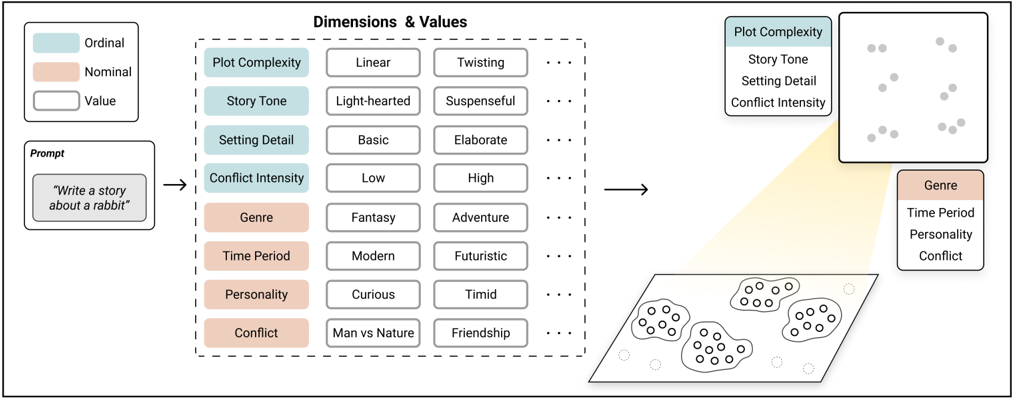
“Table 6: Dimension Generation. Ordinal dimensions and nominal dimensions generated by Luminate given example input(s) across different tasks including story writing, email writing, copywriting and song lyrics.”
plaindirect- Asserted: passes — The authors put it forward as true.
- Checkable: passes — It can be checked against evidence.
- Load-bearing: passes — The paper’s conclusions depend on it.
- Based: passes — The paper gives a reason why it holds.
None of the sources cited for this claim have been checked yet.
In the paper
“the capacity to instantly produce tens to hundreds of outputs is especially conducive to assisting users in developing a comprehensive understanding of the design space [32, 39]”
What the sources say
- Not checked yetcites [32] [32] Kim Halskov and Caroline Lundqvist. 2021. Filtering and informing the design space: Towards design-space thinking. ACM Transactions on Computer-Human Interaction (TOCHI) 28, 1 (2021), 1-28. https://doi.org/10.1145/3434462 - source
Checked before — its earlier verdict is held back until a new check runs.
- Not checked yetcites [39] [39] Martin Jonsson and Jakob Tholander. 2022. Cracking the code: Co-coding with AI in creative programming education. In Proceedings of the 14th Conference on Creativity and Cognition . 5-14. https://doi.org/10.1145/3527927.3532801 - source
Checked before — its earlier verdict is held back until a new check runs.
plaindirect- Asserted: passes — The authors put it forward as true.
- Checkable: passes — It can be checked against evidence.
- Load-bearing: passes — The paper’s conclusions depend on it.
- Based: passes — The paper gives a reason why it holds.
- Not checked yet
None of the sources cited for this claim have been checked yet.
In the paper
“helping them understand the design space -the space of possible ideas and solutions to a task and problem has been found to play an essential role in creative processes [23, 34, 45, 57].”
What the sources say
- Not checked yetcites [23] [23] Graham Dove, Nicolai Brodersen Hansen, and Kim Halskov. 2016. An argument for design space reflection. In Proceedings of the 9th Nordic Conference on HumanComputer Interaction . 1-10. https://doi.org/10.1145/2971485.2971528 - source
Checked before — its earlier verdict is held back until a new check runs.
- Not checked yetcites [34] [34] Chris Heape. 2007. The Design Space: the design process as the construction, exploration and expansion of a conceptual space. (2007). https://www.semanticscholar.org/paper/The-Design-Space%3A-the-designprocess-as-the-and-of-Heape/40b912badea3b575a8f4bde95df4f83a4427ab78 -
- Not checked yetcites [45] [45] James Derek Lomas, Mihovil Karac, and Mathieu Gielen. 2021. Design space cards: using a card deck to navigate the design space of interactive play. Proceedings of the ACM on Human-Computer Interaction 5, CHI PLAY (2021), 1-21. https: //doi.org/10.1145/3474654 - source
Checked before — its earlier verdict is held back until a new check runs.
- Not checked yetcites [57] [57] Mary Shaw. 2011. The role of design spaces. IEEE software 29, 1 (2011), 46-50. https://doi.org/10.1109/MS.2011.121 - source
Checked before — its earlier verdict is held back until a new check runs.
plaincorrelational- Asserted: passes — The authors put it forward as true.
- Checkable: passes — It can be checked against evidence.
- Load-bearing: passes — The paper’s conclusions depend on it.
- Based: passes — The paper gives a reason why it holds.
- Not checked yet
A conclusion the paper draws from its own results — it cites no other source for it, so there is none to check. The quote shows it is in the paper.
In the paper
“Specifically, they do not provide a design space for reflection and exploration to facilitate and encourage design space thinking .”
plain- Asserted: passes — The authors put it forward as true.
- Checkable: passes — It can be checked against evidence.
- Load-bearing: passes — The paper’s conclusions depend on it.
- Based: passes — The paper gives a reason why it holds.
A conclusion the paper draws from its own results — it cites no other source for it, so there is none to check. The quote shows it is in the paper.
In the paper
“This may have affected Luminate's perceived value in supporting writing tasks, causing participants to favor conventional AI tools such as ChatGPT for longer and more detailed outputs.”
hedgedconditional- Asserted: passes — The authors put it forward as true.
- Checkable: passes — It can be checked against evidence.
- Load-bearing: unclear — It is unclear whether the paper’s conclusions depend on it.
- Based: passes — The paper gives a reason why it holds.
A conclusion the paper draws from its own results — it cites no other source for it, so there is none to check. The quote shows it is in the paper.
In the paper
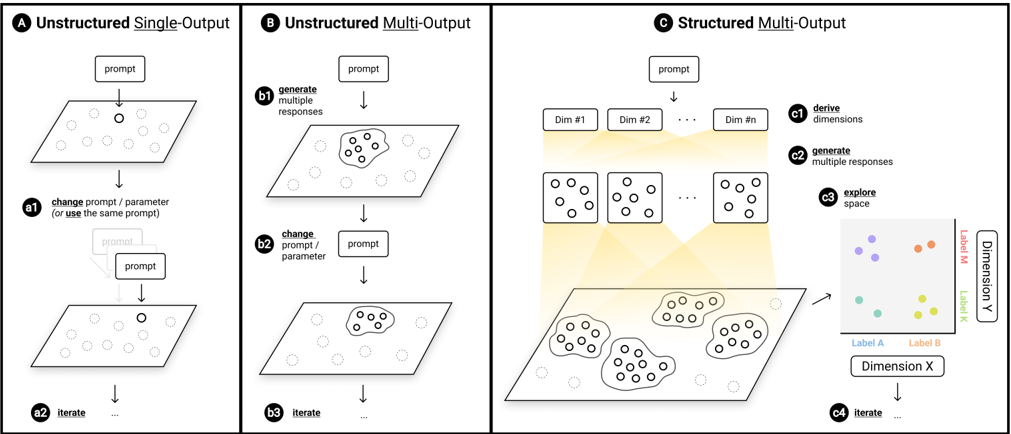
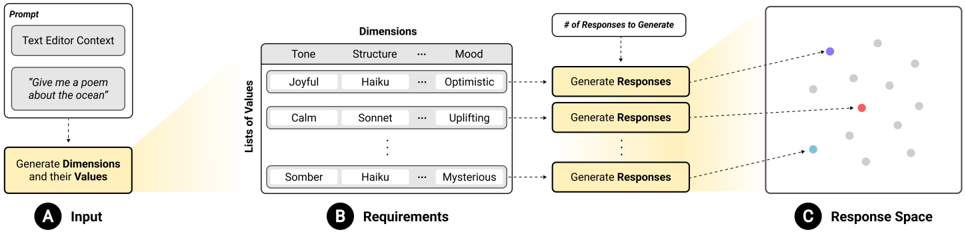
“we developed a framework - Prompting for Design Space that enables the structured creation of a design space.”
plaindirect- Asserted: passes — The authors put it forward as true.
- Checkable: passes — It can be checked against evidence.
- Load-bearing: passes — The paper’s conclusions depend on it.
- Based: passes — The paper gives a reason why it holds.
None of the sources cited for this claim have been checked yet.
In the paper
“These fields repeatedly demonstrated that explicit enumeration of, visualizing data within, and interaction with the principle dimensions associated with the target domains or tasks can enhance understanding and exploration of the design space.”
boosteddirect- Asserted: passes — The authors put it forward as true.
- Checkable: passes — It can be checked against evidence.
- Load-bearing: passes — The paper’s conclusions depend on it.
- Based: passes — The paper gives a reason why it holds.
A conclusion the paper draws from its own results — it cites no other source for it, so there is none to check. The quote shows it is in the paper.
In the paper
“The analysis of participants' survey, interview responses, and exploration suggest that Luminate helps users engage in divergent thinking.”
hedgeddirect- Asserted: passes — The authors put it forward as true.
- Checkable: passes — It can be checked against evidence.
- Load-bearing: passes — The paper’s conclusions depend on it.
- Based: passes — The paper gives a reason why it holds.
A conclusion the paper draws from its own results — it cites no other source for it, so there is none to check. The quote shows it is in the paper.
In the paper
“This workflow suggests that a single batch of responses can provide enough assistance for some creative writing tasks.”
hedgedconditionalSingle case- Asserted: passes — The authors put it forward as true.
- Checkable: passes — It can be checked against evidence.
- Load-bearing: unclear — It is unclear whether the paper’s conclusions depend on it.
- Based: passes — The paper gives a reason why it holds.
A conclusion the paper draws from its own results — it cites no other source for it, so there is none to check. The quote shows it is in the paper.
In the paper
“It helps by shifting the focus from prompt engineering to exploring and generating new ideas.”
plaindirect- Asserted: passes — The authors put it forward as true.
- Checkable: passes — It can be checked against evidence.
- Load-bearing: passes — The paper’s conclusions depend on it.
- Based: passes — The paper gives a reason why it holds.
None of the sources cited for this claim have been checked yet.
In the paper
“First, people normally do not reason with dimensions, mainly due to the challenges associated with identifying (and remembering) the list of relevant dimensions.”
plaindirect- Asserted: passes — The authors put it forward as true.
- Checkable: passes — It can be checked against evidence.
- Load-bearing: passes — The paper’s conclusions depend on it.
- Based: passes — The paper gives a reason why it holds.
None of the sources cited for this claim have been checked yet.
In the paper
“recent text-to-image generation systems that generate multiple images for exploration focus on helping users refine their prompts to find the image that fits their desired quality or characteristics [11, 26].”
What the sources say
- Not checked yetcites [11] [11] Stephen Brade, Bryan Wang, Mauricio Sousa, Sageev Oore, and Tovi Grossman. 2023. Promptify: Text-to-Image Generation through Interactive Prompt Exploration with Large Language Models. arXiv preprint arXiv:2304.09337 (2023). https://doi.org/10.48550/arXiv.2304.09337 - source
Checked before — its earlier verdict is held back until a new check runs.
- Not checked yetcites [26] [26] Yingchaojie Feng, Xingbo Wang, Kam Kwai Wong, Sijia Wang, Yuhong Lu, Minfeng Zhu, Baicheng Wang, and Wei Chen. 2023. PromptMagician: Interactive Prompt Engineering for Text-to-Image Creation. arXiv preprint arXiv:2307.09036 (2023). https://doi.org/10.48550/arXiv.2307.09036 - source
Checked before — its earlier verdict is held back until a new check runs.
plaindirect- Asserted: passes — The authors put it forward as true.
- Checkable: passes — It can be checked against evidence.
- Load-bearing: passes — The paper’s conclusions depend on it.
- Based: passes — The paper gives a reason why it holds.
- Not checked yet
A conclusion the paper draws from its own results — it cites no other source for it, so there is none to check. The quote shows it is in the paper.
In the paper
“This iterative approach enabled P3 to build upon numerous ideas and refine his initial ideas, ultimately leading to complex and nuanced creative outcomes.”
plaindirectSingle case- Asserted: passes — The authors put it forward as true.
- Checkable: passes — It can be checked against evidence.
- Load-bearing: unclear — It is unclear whether the paper’s conclusions depend on it.
- Based: passes — The paper gives a reason why it holds.
None of the sources cited for this claim have been checked yet.
In the paper
“Simultaneously, design space plays a crucial role in generating new designs, ideas, and artifacts [6, 50].”
What the sources say
- Not checked yetcites [6] [6] Michel Beaudouin-Lafon, Susanne Bødker, and Wendy E. Mackay. 2021. Generative Theories of Interaction. ACM Transactions on Computer-Human Interaction (TOCHI) 28, 6 (2021), 1-54. https://doi.org/10.1145/3468505 - source
- Not checked yetcites [50] [50] Stephen MacNeil, Johanna Okerlund, and Celine Latulipe. 2017. Dimensional reasoning and research design spaces. In Proceedings of the 2017 ACM SIGCHI Conference on Creativity and Cognition . 367-379. https://doi.org/10.1145/3059454. 3059472 - source
plaindirect- Asserted: passes — The authors put it forward as true.
- Checkable: passes — It can be checked against evidence.
- Load-bearing: passes — The paper’s conclusions depend on it.
- Based: passes — The paper gives a reason why it holds.
A conclusion the paper draws from its own results — it cites no other source for it, so there is none to check. The quote shows it is in the paper.
In the paper
“our work demonstrates how humans and LLMs can complement each other during creative exploration.”
boostedcorrelational- Asserted: passes — The authors put it forward as true.
- Checkable: passes — It can be checked against evidence.
- Load-bearing: passes — The paper’s conclusions depend on it.
- Based: passes — The paper gives a reason why it holds.
- Rests on an assumption: LLMs excel at quickly generating information.
- Rests on an assumption: Humans are slower in producing a variety of responses (that vary in tone, composition, etc.) but excel at comprehending a broader context and the requirements of the tasks at hand.
- Rests on an assumption: Humans can judge which response is best suited for a given task.
In the paper
“MacNeil et al. [50] found that even experts struggle when asked to compile a list of relevant dimensions within their domains of expertise.”
What the sources say
- Not checked yetcites [50] [50] Stephen MacNeil, Johanna Okerlund, and Celine Latulipe. 2017. Dimensional reasoning and research design spaces. In Proceedings of the 2017 ACM SIGCHI Conference on Creativity and Cognition . 367-379. https://doi.org/10.1145/3059454. 3059472 - source
plain- Asserted: passes — The authors put it forward as true.
- Checkable: passes — It can be checked against evidence.
- Load-bearing: passes — The paper’s conclusions depend on it.
- Based: passes — The paper gives a reason why it holds.
A conclusion the paper draws from its own results — it cites no other source for it, so there is none to check. The quote shows it is in the paper.
In the paper
“The flexible interactions and exploration view enable creative exploration.”
plaindirect- Asserted: passes — The authors put it forward as true.
- Checkable: passes — It can be checked against evidence.
- Load-bearing: passes — The paper’s conclusions depend on it.
- Based: passes — The paper gives a reason why it holds.
- Probably not a substantial claim. 83
- It may state two separate claims as one. 40
- The quote only partly states this claim. 3
The sources with a verdict support this claim; the rest weren’t checked yet, have no full text we could read, or their verdicts aren’t rated yet.
In the paper
“Design spaces have commonly been represented with Cartesian spaces where possible variations reside within the dimensions of a design, and variations reflect different values on those dimensions [7, 32, 45, 57].”
What the sources say
- Not checked yetcites [7] [7] Michel Beaudouin-Lafon and Wendy E Mackay. 2007. Prototyping tools and techniques. In The human-computer interaction handbook . CRC Press, 10431066. https://www.kth.se/social/upload/52ef5ee4f2765445a466a28a/mackaylafon-prototypes-52-HCI.pdf - source
- Supportedcites [32] [32] Kim Halskov and Caroline Lundqvist. 2021. Filtering and informing the design space: Towards design-space thinking. ACM Transactions on Computer-Human Interaction (TOCHI) 28, 1 (2021), 1-28. https://doi.org/10.1145/3434462 - source
Section 2.2.1 describes the Cartesian representation of design space as a typical early interpretation: its dimensions represent design decisions, and alternatives are values on those dimensions. It also says a particular design occupies a point determined by a value for each parameter. (LLM, conf=0.93)
- Supportedcites [45] [45] James Derek Lomas, Mihovil Karac, and Mathieu Gielen. 2021. Design space cards: using a card deck to navigate the design space of interactive play. Proceedings of the ACM on Human-Computer Interaction 5, CHI PLAY (2021), 1-21. https: //doi.org/10.1145/3474654 - source
Section 2.3 (page not supplied) describes design spaces as variations within design dimensions or parameters and recounts their representation as multidimensional Cartesian parameter spaces. It also quotes a formulation in which each Cartesian axis is a design variable and each point represents a design. (LLM, conf=0.90)
- Not checked yetcites [57] [57] Mary Shaw. 2011. The role of design spaces. IEEE software 29, 1 (2011), 46-50. https://doi.org/10.1109/MS.2011.121 - source
plain- Asserted: passes — The authors put it forward as true.
- Checkable: passes — It can be checked against evidence.
- Load-bearing: fails — The paper’s conclusions may not depend on it.
- Based: passes — The paper gives a reason why it holds.
Probably not a substantial claim. The paper’s conclusions may not depend on it.
A result the paper reports from its own data — it cites no other source for it, so there is none to check. The quote shows it is in the paper.
In the paper
“We demonstrate the feasibility and usefulness of this framework through the design and development of an interactive system, Luminate, and a user study with 14 professional writers.”
boosted- Asserted: passes — The authors put it forward as true.
- Checkable: passes — It can be checked against evidence.
- Load-bearing: passes — The paper’s conclusions depend on it.
- Based: passes — The paper gives a reason why it holds.
It may state two separate claims as one.
A result the paper reports from its own data — it cites no other source for it, so there is none to check. The quote shows it is in the paper.
In the paper
“while Luminate scored relatively high in all dimensions, participants found it provided the strongest support for the exploration of ideas (M = 18.21, SD = 1.76) and regarded it as the most important aspect (Avg. Factor Count = 4).”
plain- Asserted: passes — The authors put it forward as true.
- Checkable: passes — It can be checked against evidence.
- Load-bearing: passes — The paper’s conclusions depend on it.
- Based: passes — The paper gives a reason why it holds.
It may state two separate claims as one.
A result the paper reports from its own data — it cites no other source for it, so there is none to check. The quote shows it is in the paper.
In the paper
“* Appear 'too many request' error when calling OpenAI API”
hedged- Asserted: passes — The authors put it forward as true.
- Checkable: passes — It can be checked against evidence.
- Load-bearing: fails — The paper’s conclusions may not depend on it.
- Based: passes — The paper gives a reason why it holds.
Probably not a substantial claim. The paper’s conclusions may not depend on it.
A result the paper reports from its own data — it cites no other source for it, so there is none to check. The quote shows it is in the paper.
In the paper
“| 6 | 4.91 | 0/2 | 4.19 | 0/2 | 4.63 | 0/2 | 4.58 | 0/6 |”
plain- Asserted: passes — The authors put it forward as true.
- Checkable: passes — It can be checked against evidence.
- Load-bearing: fails — The paper’s conclusions may not depend on it.
- Based: passes — The paper gives a reason why it holds.
Probably not a substantial claim. The paper’s conclusions may not depend on it.
A result the paper reports from its own data — it cites no other source for it, so there is none to check. The quote shows it is in the paper.
In the paper
“creativity always appeared as an ordinal dimension with labels [ least , less , neutral , more , most ].”
plain- Asserted: passes — The authors put it forward as true.
- Checkable: passes — It can be checked against evidence.
- Load-bearing: fails — The paper’s conclusions may not depend on it.
- Based: passes — The paper gives a reason why it holds.
Probably not a substantial claim. The paper’s conclusions may not depend on it.
A result the paper reports from its own data — it cites no other source for it, so there is none to check. The quote shows it is in the paper.
In the paper
“In response to P1's prompt , Luminate generated [ gender ] as one of nominal dimensions.”
plaindirectSingle case- Asserted: passes — The authors put it forward as true.
- Checkable: passes — It can be checked against evidence.
- Load-bearing: fails — The paper’s conclusions may not depend on it.
- Based: passes — The paper gives a reason why it holds.
Probably not a substantial claim. The paper’s conclusions may not depend on it.
A result the paper reports from its own data — it cites no other source for it, so there is none to check. The quote shows it is in the paper.
In the paper
“Although many appreciated being able to see multiple responses from a prompt”
plain- Asserted: passes — The authors put it forward as true.
- Checkable: passes — It can be checked against evidence.
- Load-bearing: fails — The paper’s conclusions may not depend on it.
- Based: passes — The paper gives a reason why it holds.
Probably not a substantial claim. The paper’s conclusions may not depend on it.
A result the paper reports from its own data — it cites no other source for it, so there is none to check. The quote shows it is in the paper.
In the paper
“| 40 | 7.63 | 1/81 | 9.12 | 0/80 | 7.94 | 1/81 | 8.23 | 2/242 |”
plain- Asserted: passes — The authors put it forward as true.
- Checkable: passes — It can be checked against evidence.
- Load-bearing: fails — The paper’s conclusions may not depend on it.
- Based: passes — The paper gives a reason why it holds.
Probably not a substantial claim. The paper’s conclusions may not depend on it.
A result the paper reports from its own data — it cites no other source for it, so there is none to check. The quote shows it is in the paper.
In the paper
“It simplifies the workflow by providing dimensions as an outline.”
- Also stated in: § 6.4 How Does Luminate Compare to Existing Approaches? What Benefits or Challenges Does This Approach Introduce? · p. 15 · plain
“They said Luminate simplifies this workflow, equating Luminate generating dimensions as creating an outline.”
plaindirect- Asserted: passes — The authors put it forward as true.
- Checkable: passes — It can be checked against evidence.
- Load-bearing: fails — The paper’s conclusions may not depend on it.
- Based: passes — The paper gives a reason why it holds.
Probably not a substantial claim. The paper’s conclusions may not depend on it.
- Also stated in: § 6.4 How Does Luminate Compare to Existing Approaches? What Benefits or Challenges Does This Approach Introduce? · p. 15 · plain
A result the paper reports from its own data — it cites no other source for it, so there is none to check. The quote shows it is in the paper.
In the paper
“Five participants who answered neutral or disagreed explained there was not enough time to learn and utilize all the features to their potential.”
plaindirectn = 5- Asserted: passes — The authors put it forward as true.
- Checkable: passes — It can be checked against evidence.
- Load-bearing: fails — The paper’s conclusions may not depend on it.
- Based: passes — The paper gives a reason why it holds.
Probably not a substantial claim. The paper’s conclusions may not depend on it.
A result the paper reports from its own data — it cites no other source for it, so there is none to check. The quote shows it is in the paper.
In the paper
“The way Luminate expands a prompt was also seen as a unique feature that encourages deeper thinking.”
plaindirect- Asserted: passes — The authors put it forward as true.
- Checkable: passes — It can be checked against evidence.
- Load-bearing: fails — The paper’s conclusions may not depend on it.
- Based: passes — The paper gives a reason why it holds.
Probably not a substantial claim. The paper’s conclusions may not depend on it.
A result the paper reports from its own data — it cites no other source for it, so there is none to check. The quote shows it is in the paper.
In the paper
“Several participants shared they generally write an outline first and then use AI to expand on it.”
plain- Asserted: passes — The authors put it forward as true.
- Checkable: passes — It can be checked against evidence.
- Load-bearing: fails — The paper’s conclusions may not depend on it.
- Based: passes — The paper gives a reason why it holds.
Probably not a substantial claim. The paper’s conclusions may not depend on it.
A result the paper reports from its own data — it cites no other source for it, so there is none to check. The quote shows it is in the paper.
In the paper
“Participants still prefer Luminate for brainstorming and creative tasks even after prolonged use.”
- Also stated in: § 6.5 Prolonged Use in the Wild: Do Participants Still Find Luminate Useful After Using It in the Wild for an Extended Period of Time? · p. 15 · plain
“all the participants still maintained that they prefer Luminate for brainstorming and creative tasks.”
plain- Asserted: passes — The authors put it forward as true.
- Checkable: passes — It can be checked against evidence.
- Load-bearing: passes — The paper’s conclusions depend on it.
- Based: passes — The paper gives a reason why it holds.
It may state two separate claims as one. The quote only partly states this claim.
- Also stated in: § 6.5 Prolonged Use in the Wild: Do Participants Still Find Luminate Useful After Using It in the Wild for an Extended Period of Time? · p. 15 · plain
A result the paper reports from its own data — it cites no other source for it, so there is none to check. The quote shows it is in the paper.
In the paper
“| 80* | 8.72 | 9/169 | 9.42 | 9/169 | 11.11 | 9/169 | 9.75 | 27/507 |”
plain- Asserted: passes — The authors put it forward as true.
- Checkable: passes — It can be checked against evidence.
- Load-bearing: fails — The paper’s conclusions may not depend on it.
- Based: passes — The paper gives a reason why it holds.
Probably not a substantial claim. The paper’s conclusions may not depend on it.
A result the paper reports from its own data — it cites no other source for it, so there is none to check. The quote shows it is in the paper.
In the paper
“| 20 | 7.75 | 0/40 | 8.01 | 0/40 | 6.79 | 0/40 | 7.52 | 0/120 |”
plain- Asserted: passes — The authors put it forward as true.
- Checkable: passes — It can be checked against evidence.
- Load-bearing: fails — The paper’s conclusions may not depend on it.
- Based: passes — The paper gives a reason why it holds.
Probably not a substantial claim. The paper’s conclusions may not depend on it.
A result the paper reports from its own data — it cites no other source for it, so there is none to check. The quote shows it is in the paper.
In the paper
“| 10 | 6.07 | 0/2 | 8.13 | 1/3 | 5.91 | 0/2 | 6.70 | 1/7 |”
plain- Asserted: passes — The authors put it forward as true.
- Checkable: passes — It can be checked against evidence.
- Load-bearing: fails — The paper’s conclusions may not depend on it.
- Based: passes — The paper gives a reason why it holds.
Probably not a substantial claim. The paper’s conclusions may not depend on it.
A result the paper reports from its own data — it cites no other source for it, so there is none to check. The quote shows it is in the paper.
In the paper
“and found them very useful (7 Strongly Agree, 7 Agree) and relevant (4 Strongly Agree, 9 Agree, 1 Neutral) for exploring ideas and reflecting on the design space.”
plain- Asserted: passes — The authors put it forward as true.
- Checkable: passes — It can be checked against evidence.
- Load-bearing: passes — The paper’s conclusions depend on it.
- Based: passes — The paper gives a reason why it holds.
It may state two separate claims as one.
A result the paper reports from its own data — it cites no other source for it, so there is none to check. The quote shows it is in the paper.
In the paper
“participants also felt the responses were creative, saying that Luminate 'showed ideas [they] did not think of' (P5) and 'helped think outside the box' (P2).”
plain- Asserted: passes — The authors put it forward as true.
- Checkable: passes — It can be checked against evidence.
- Load-bearing: passes — The paper’s conclusions depend on it.
- Based: passes — The paper gives a reason why it holds.
It may state two separate claims as one.
A result the paper reports from its own data — it cites no other source for it, so there is none to check. The quote shows it is in the paper.
In the paper
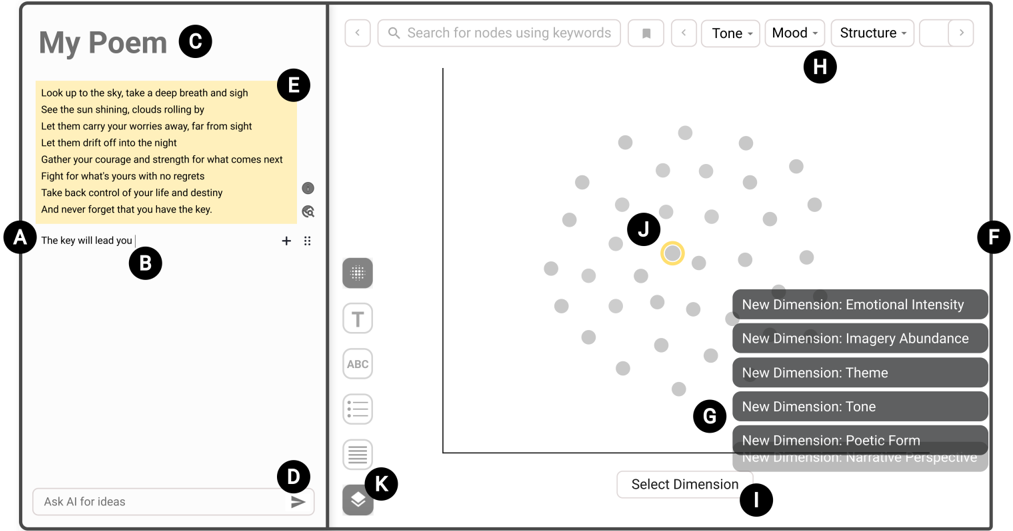
“On average, participants selected the dimension button 1.8 times (SD = 2.1, range = [0, 7]), exploring 1.1 unique (SD = 1.2, range = [0, 4]) 1dimensional and 1.2 unique (SD = 1.7, range = [0, 4]) 2-dimensional design spaces.”
plain- Asserted: passes — The authors put it forward as true.
- Checkable: passes — It can be checked against evidence.
- Load-bearing: unclear — It is unclear whether the paper’s conclusions depend on it.
- Based: passes — The paper gives a reason why it holds.
It may state two separate claims as one.
A result the paper reports from its own data — it cites no other source for it, so there is none to check. The quote shows it is in the paper.
In the paper
“As a result, participants suggested that Luminate can help avoid fixation.”
hedgedconditional- Asserted: passes — The authors put it forward as true.
- Checkable: passes — It can be checked against evidence.
- Load-bearing: passes — The paper’s conclusions depend on it.
- Based: passes — The paper gives a reason why it holds.
Probably not a substantial claim.
A result the paper reports from its own data — it cites no other source for it, so there is none to check. The quote shows it is in the paper.
In the paper
“A user study demonstrating that enabling dimensional exploration of LLM output space has the potential to prevent fixation and nurture design space thinking.”
hedgedconditional- Asserted: passes — The authors put it forward as true.
- Checkable: passes — It can be checked against evidence.
- Load-bearing: passes — The paper’s conclusions depend on it.
- Based: passes — The paper gives a reason why it holds.
It may state two separate claims as one.
A result the paper reports from its own data — it cites no other source for it, so there is none to check. The quote shows it is in the paper.
In the paper
“| 60 | 9.01 | 0/120 | 9.51 | 1/121 | 8.05 | 0/120 | 8.88 | 1/361 |”
plain- Asserted: passes — The authors put it forward as true.
- Checkable: passes — It can be checked against evidence.
- Load-bearing: fails — The paper’s conclusions may not depend on it.
- Based: passes — The paper gives a reason why it holds.
Probably not a substantial claim. The paper’s conclusions may not depend on it.
A result the paper reports from its own data — it cites no other source for it, so there is none to check. The quote shows it is in the paper.
In the paper
“* Appear 'too many request' error when calling OpenAI API”
hedged- Asserted: passes — The authors put it forward as true.
- Checkable: passes — It can be checked against evidence.
- Load-bearing: fails — The paper’s conclusions may not depend on it.
- Based: passes — The paper gives a reason why it holds.
Probably not a substantial claim. The paper’s conclusions may not depend on it. The quote only partly states this claim.
A result the paper reports from its own data — it cites no other source for it, so there is none to check. The quote shows it is in the paper.
In the paper
“| 14* | 20.25 | 4/6 | 44.82 | 6/8 | 32.19 | 3/5 | 32.42 | 13/19 |”
plain- Asserted: passes — The authors put it forward as true.
- Checkable: passes — It can be checked against evidence.
- Load-bearing: fails — The paper’s conclusions may not depend on it.
- Based: passes — The paper gives a reason why it holds.
Probably not a substantial claim. The paper’s conclusions may not depend on it.
A result the paper reports from its own data — it cites no other source for it, so there is none to check. The quote shows it is in the paper.
In the paper
“nominal dimensions occasionally demonstrated instances suggesting the need for calibration.”
hedgedSingle case- Asserted: passes — The authors put it forward as true.
- Checkable: passes — It can be checked against evidence.
- Load-bearing: fails — The paper’s conclusions may not depend on it.
- Based: passes — The paper gives a reason why it holds.
Probably not a substantial claim. The paper’s conclusions may not depend on it.
A result the paper reports from its own data — it cites no other source for it, so there is none to check. The quote shows it is in the paper.
In the paper
“It empowers users as it expands their prompt and allows them to steer the response generation.”
plaindirect- Asserted: passes — The authors put it forward as true.
- Checkable: passes — It can be checked against evidence.
- Load-bearing: passes — The paper’s conclusions depend on it.
- Based: passes — The paper gives a reason why it holds.
It may state two separate claims as one.
A result the paper reports from its own data — it cites no other source for it, so there is none to check. The quote shows it is in the paper.
In the paper
“They found that it offers variation, serendipitous responses (P2), and the ability to mix-and-match different responses (P5) and think outside the box (P10).”
plain- Asserted: passes — The authors put it forward as true.
- Checkable: passes — It can be checked against evidence.
- Load-bearing: passes — The paper’s conclusions depend on it.
- Based: passes — The paper gives a reason why it holds.
It may state two separate claims as one.
The paper states this without a source or data behind it here, so there is nothing to check it against. The quote shows it is in the paper.
In the paper
“Luminate currently generates a set of categorical dimensions - ordinal and nominal dimensions.”
plain- Asserted: passes — The authors put it forward as true.
- Checkable: passes — It can be checked against evidence.
- Load-bearing: fails — The paper’s conclusions may not depend on it.
- Based: passes — The paper gives a reason why it holds.
Probably not a substantial claim. The paper’s conclusions may not depend on it.
A result the paper reports from its own data — it cites no other source for it, so there is none to check. The quote shows it is in the paper.
In the paper
“our own testing and user study revealed that these dimensions can vary in usefulness.”
plain- Asserted: passes — The authors put it forward as true.
- Checkable: passes — It can be checked against evidence.
- Load-bearing: fails — The paper’s conclusions may not depend on it.
- Based: passes — The paper gives a reason why it holds.
Probably not a substantial claim. The paper’s conclusions may not depend on it.
A result the paper reports from its own data — it cites no other source for it, so there is none to check. The quote shows it is in the paper.
In the paper
“| 20 | 7.75 | 0/40 | 8.01 | 0/40 | 6.79 | 0/40 | 7.52 | 0/120 |”
plain- Asserted: passes — The authors put it forward as true.
- Checkable: passes — It can be checked against evidence.
- Load-bearing: fails — The paper’s conclusions may not depend on it.
- Based: passes — The paper gives a reason why it holds.
Probably not a substantial claim. The paper’s conclusions may not depend on it.
A result the paper reports from its own data — it cites no other source for it, so there is none to check. The quote shows it is in the paper.
In the paper
“the user did not find it useful for exploring the design space.”
plainSingle case- Asserted: passes — The authors put it forward as true.
- Checkable: passes — It can be checked against evidence.
- Load-bearing: fails — The paper’s conclusions may not depend on it.
- Based: passes — The paper gives a reason why it holds.
Probably not a substantial claim. The paper’s conclusions may not depend on it.
A result the paper reports from its own data — it cites no other source for it, so there is none to check. The quote shows it is in the paper.
In the paper
“| 6 | 4.91 | 0/2 | 4.19 | 0/2 | 4.63 | 0/2 | 4.58 | 0/6 |”
plain- Asserted: passes — The authors put it forward as true.
- Checkable: passes — It can be checked against evidence.
- Load-bearing: fails — The paper’s conclusions may not depend on it.
- Based: passes — The paper gives a reason why it holds.
Probably not a substantial claim. The paper’s conclusions may not depend on it.
A result the paper reports from its own data — it cites no other source for it, so there is none to check. The quote shows it is in the paper.
In the paper
“| 60 | 9.01 | 0/120 | 9.51 | 1/121 | 8.05 | 0/120 | 8.88 | 1/361 |”
plain- Asserted: passes — The authors put it forward as true.
- Checkable: passes — It can be checked against evidence.
- Load-bearing: fails — The paper’s conclusions may not depend on it.
- Based: passes — The paper gives a reason why it holds.
Probably not a substantial claim. The paper’s conclusions may not depend on it.
A result the paper reports from its own data — it cites no other source for it, so there is none to check. The quote shows it is in the paper.
In the paper
“| 14* | 20.25 | 4/6 | 44.82 | 6/8 | 32.19 | 3/5 | 32.42 | 13/19 |”
plain- Asserted: passes — The authors put it forward as true.
- Checkable: passes — It can be checked against evidence.
- Load-bearing: fails — The paper’s conclusions may not depend on it.
- Based: passes — The paper gives a reason why it holds.
Probably not a substantial claim. The paper’s conclusions may not depend on it.
A result the paper reports from its own data — it cites no other source for it, so there is none to check. The quote shows it is in the paper.
In the paper
“| 40 | 7.63 | 1/81 | 9.12 | 0/80 | 7.94 | 1/81 | 8.23 | 2/242 |”
plain- Asserted: passes — The authors put it forward as true.
- Checkable: passes — It can be checked against evidence.
- Load-bearing: fails — The paper’s conclusions may not depend on it.
- Based: passes — The paper gives a reason why it holds.
Probably not a substantial claim. The paper’s conclusions may not depend on it.
A result the paper reports from its own data — it cites no other source for it, so there is none to check. The quote shows it is in the paper.
In the paper
“| 10 | 6.07 | 0/2 | 8.13 | 1/3 | 5.91 | 0/2 | 6.70 | 1/7 |”
plain- Asserted: passes — The authors put it forward as true.
- Checkable: passes — It can be checked against evidence.
- Load-bearing: fails — The paper’s conclusions may not depend on it.
- Based: passes — The paper gives a reason why it holds.
Probably not a substantial claim. The paper’s conclusions may not depend on it.
A result the paper reports from its own data — it cites no other source for it, so there is none to check. The quote shows it is in the paper.
In the paper
“felt the agency of choosing a response from multiple alternatives outperforms having only a single response - especially in the brainstorming stage”
plaindirect- Asserted: passes — The authors put it forward as true.
- Checkable: passes — It can be checked against evidence.
- Load-bearing: passes — The paper’s conclusions depend on it.
- Based: passes — The paper gives a reason why it holds.
Probably not a substantial claim.
A result the paper reports from its own data — it cites no other source for it, so there is none to check. The quote shows it is in the paper.
In the paper
“On average, each participant prompted 4.3 times (SD = 3.9, range = [1, 15]) and explored 13.8 responses (SD = 7.6, range = [4, 26]) during the 25-minute study session.”
plain- Asserted: passes — The authors put it forward as true.
- Checkable: passes — It can be checked against evidence.
- Load-bearing: unclear — It is unclear whether the paper’s conclusions depend on it.
- Based: passes — The paper gives a reason why it holds.
It may state two separate claims as one.
In the paper
“They also found Luminate provided creativity support, scoring CSI at 82.16 (SD = 5.14) - a high score for creativity support index [17].”
What the sources say
- Not checked yetcites [17] [17] Erin Cherry and Celine Latulipe. 2014. Quantifying the creativity support of digital tools through the creativity support index. ACMTransactions on ComputerHuman Interaction (TOCHI) 21, 4 (2014), 1-25. https://doi.org/10.1145/2617588 - source
plain- Asserted: passes — The authors put it forward as true.
- Checkable: passes — It can be checked against evidence.
- Load-bearing: passes — The paper’s conclusions depend on it.
- Based: passes — The paper gives a reason why it holds.
It may state two separate claims as one.
A result the paper reports from its own data — it cites no other source for it, so there is none to check. The quote shows it is in the paper.
In the paper
“we found some participants expressed a desire for longer responses, and some even wanted fewer responses.”
plain- Asserted: passes — The authors put it forward as true.
- Checkable: passes — It can be checked against evidence.
- Load-bearing: passes — The paper’s conclusions depend on it.
- Based: passes — The paper gives a reason why it holds.
It may state two separate claims as one.
A result the paper reports from its own data — it cites no other source for it, so there is none to check. The quote shows it is in the paper.
In the paper
“| 80* | 8.72 | 9/169 | 9.42 | 9/169 | 11.11 | 9/169 | 9.75 | 27/507 |”
plain- Asserted: passes — The authors put it forward as true.
- Checkable: passes — It can be checked against evidence.
- Load-bearing: fails — The paper’s conclusions may not depend on it.
- Based: passes — The paper gives a reason why it holds.
Probably not a substantial claim. The paper’s conclusions may not depend on it.
A result the paper reports from its own data — it cites no other source for it, so there is none to check. The quote shows it is in the paper.
In the paper
“P7 steered the system towards producing responses that aligned more closely with her evolving creative vision, allowing her to get the version that matched the desired tone and formality .”
plaindirectSingle case- Asserted: passes — The authors put it forward as true.
- Checkable: passes — It can be checked against evidence.
- Load-bearing: fails — The paper’s conclusions may not depend on it.
- Based: passes — The paper gives a reason why it holds.
Probably not a substantial claim. The paper’s conclusions may not depend on it. It may state two separate claims as one.
A result the paper reports from its own data — it cites no other source for it, so there is none to check. The quote shows it is in the paper.
In the paper
“After the study, participants showed strong interest in Luminate, asking when the tool would become publicly available.”
boosted- Asserted: passes — The authors put it forward as true.
- Checkable: passes — It can be checked against evidence.
- Load-bearing: fails — The paper’s conclusions may not depend on it.
- Based: passes — The paper gives a reason why it holds.
Probably not a substantial claim. The paper’s conclusions may not depend on it.
A result the paper reports from its own data — it cites no other source for it, so there is none to check. The quote shows it is in the paper.
In the paper
“The way Luminate generates many diverse responses was also seen as an approach that better aligns with how they think and work as creative professionals.”
plain- Asserted: passes — The authors put it forward as true.
- Checkable: passes — It can be checked against evidence.
- Load-bearing: fails — The paper’s conclusions may not depend on it.
- Based: passes — The paper gives a reason why it holds.
Probably not a substantial claim. The paper’s conclusions may not depend on it.
None of the sources cited for this claim have been checked yet.
In the paper
“Without first exploring diverse ideas, one can hastily converge to a sub-optimal idea and spend time iterating on it without considering other options - a phenomenon called fixation that hinders creative processes [19, 24, 37].”
What the sources say
- Not checked yetcites [19] [19] Nigel Cross. 2004. Expertise in design: an overview. Design studies 25, 5 (2004), 427-441. https://doi.org/10.1016/j.destud.2004.06.002 - source
- Not checked yetcites [24] [24] Steven P Dow, Alana Glassco, Jonathan Kass, Melissa Schwarz, Daniel L Schwartz, and Scott R Klemmer. 2010. Parallel prototyping leads to better design results, more divergence, and increased self-efficacy. ACM Transactions on ComputerHuman Interaction (TOCHI) 17, 4 (2010), 1-24. https://doi.org/10.1145/1879831. 1879836 - source
- Not checked yetcites [37] [37] David G Jansson and Steven M Smith. 1991. Design fixation. Design studies 12, 1 (1991), 3-11. https://doi.org/10.1017/S0890060414000043 - source
plaindirect- Asserted: passes — The authors put it forward as true.
- Checkable: passes — It can be checked against evidence.
- Load-bearing: passes — The paper’s conclusions depend on it.
- Based: passes — The paper gives a reason why it holds.
It may state two separate claims as one.
A conclusion the paper draws from its own results — it cites no other source for it, so there is none to check. The quote shows it is in the paper.
In the paper
“We argue that current interaction paradigms fall short, guiding users towards rapid convergence on a limited set of ideas, rather than empowering them to explore the vast latent design space in generative models.”
plaindirect- Asserted: passes — The authors put it forward as true.
- Checkable: fails — It may be too vague to check against evidence.
- Load-bearing: passes — The paper’s conclusions depend on it.
- Based: fails — The paper may give no reason why it holds.
Probably not a substantial claim. It may be too vague to check against evidence. The paper may give no reason why it holds.
A conclusion the paper draws from its own results — it cites no other source for it, so there is none to check. The quote shows it is in the paper.
In the paper
“Our work advances how we interact with LLMs for creative tasks, introducing a way to harness the creative potential of LLMs.”
plaindirect- Asserted: passes — The authors put it forward as true.
- Checkable: fails — It may be too vague to check against evidence.
- Load-bearing: passes — The paper’s conclusions depend on it.
- Based: passes — The paper gives a reason why it holds.
Probably not a substantial claim. It may be too vague to check against evidence. It may state two separate claims as one.
None of the sources cited for this claim have been checked yet.
In the paper
“Thus, researchers have voiced the need to support design space thinking in creativity support tools, stating various benefits of offering designers the ability to leverage an understanding of the design space in creative processes [7, 10, 23, 32, 55, 57].”
What the sources say
- Not checked yetcites [7] [7] Michel Beaudouin-Lafon and Wendy E Mackay. 2007. Prototyping tools and techniques. In The human-computer interaction handbook . CRC Press, 10431066. https://www.kth.se/social/upload/52ef5ee4f2765445a466a28a/mackaylafon-prototypes-52-HCI.pdf - source
- Not checked yetcites [10] [10] Michael Mose Biskjaer, Peter Dalsgaard, and Kim Halskov. 2014. A constraintbased understanding of design spaces. In Proceedings of the 2014 conference on Designing interactive systems . 453-462. https://doi.org/10.1145/2598510.2598533 -
- Not checked yetcites [23] [23] Graham Dove, Nicolai Brodersen Hansen, and Kim Halskov. 2016. An argument for design space reflection. In Proceedings of the 9th Nordic Conference on HumanComputer Interaction . 1-10. https://doi.org/10.1145/2971485.2971528 - source
- Not checked yetcites [32] [32] Kim Halskov and Caroline Lundqvist. 2021. Filtering and informing the design space: Towards design-space thinking. ACM Transactions on Computer-Human Interaction (TOCHI) 28, 1 (2021), 1-28. https://doi.org/10.1145/3434462 - source
- Not checked yetcites [55] [55] Donald A Schön. 1992. Designing as reflective conversation with the materials of a design situation. Knowledge-based systems 5, 1 (1992), 3-14. https://doi.org/ 10.1016/0950-7051(92)90020-G - source
- Not checked yetcites [57] [57] Mary Shaw. 2011. The role of design spaces. IEEE software 29, 1 (2011), 46-50. https://doi.org/10.1109/MS.2011.121 - source
plain- Asserted: passes — The authors put it forward as true.
- Checkable: passes — It can be checked against evidence.
- Load-bearing: passes — The paper’s conclusions depend on it.
- Based: passes — The paper gives a reason why it holds.
Probably not a substantial claim.
The paper states this without a source or data behind it here, so there is nothing to check it against. The quote shows it is in the paper.
In the paper
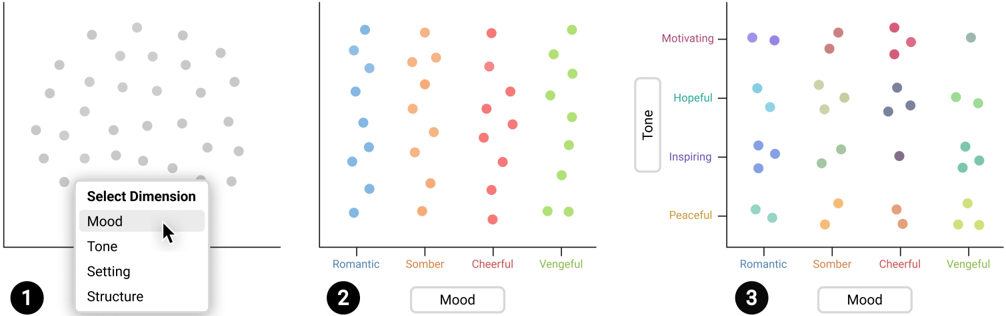
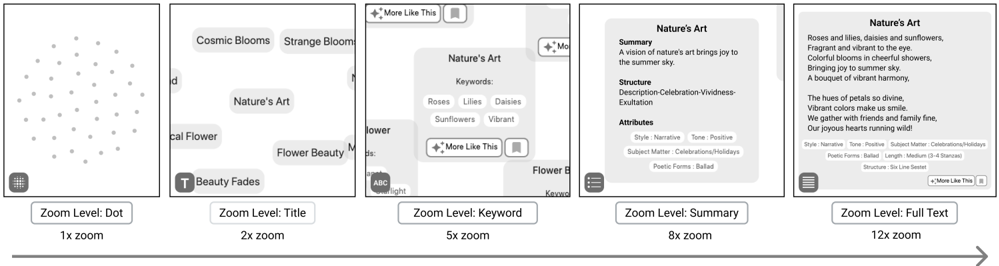
“While representing rich multivariate data points as dots on a scatter plot enables users to easily inspect the distribution of data points, such abstraction also makes it challenging to dive into the details of specific data points.”
plaindirect- Asserted: passes — The authors put it forward as true.
- Checkable: passes — It can be checked against evidence.
- Load-bearing: passes — The paper’s conclusions depend on it.
- Based: passes — The paper gives a reason why it holds.
Probably not a substantial claim.
A conclusion the paper draws from its own results — it cites no other source for it, so there is none to check. The quote shows it is in the paper.
In the paper
“However, as these aspects naturally emerge, they may not think to explore alternative ideas along those aspects and engage in divergent thinking.”
hedgedconditional- Asserted: passes — The authors put it forward as true.
- Checkable: passes — It can be checked against evidence.
- Load-bearing: passes — The paper’s conclusions depend on it.
- Based: fails — The paper may give no reason why it holds.
Probably not a substantial claim. The paper may give no reason why it holds. It may state two separate claims as one.
A conclusion the paper draws from its own results — it cites no other source for it, so there is none to check. The quote shows it is in the paper.
In the paper
“The way we interact with LLMs is designed to help users converge rather than diverge.”
plaindirect- Asserted: passes — The authors put it forward as true.
- Checkable: passes — It can be checked against evidence.
- Load-bearing: passes — The paper’s conclusions depend on it.
- Based: fails — The paper may give no reason why it holds.
Probably not a substantial claim. The paper may give no reason why it holds.
A conclusion the paper draws from its own results — it cites no other source for it, so there is none to check. The quote shows it is in the paper.
In the paper
“This highlights two issues: (1) unstructured generation : the outputs are generated in a haphazardous manner; (2) unstructured exploration : users' exploration of the design space is analogous to rummaging through the dark without a clear sense of direction and comprehensive view of the design landscape they are treading.”
plain- Asserted: passes — The authors put it forward as true.
- Checkable: passes — It can be checked against evidence.
- Load-bearing: passes — The paper’s conclusions depend on it.
- Based: passes — The paper gives a reason why it holds.
It may state two separate claims as one.
None of the sources cited for this claim have been checked yet.
In the paper
“prior research established that the interplay between the two is imperative in creative processes and noted that creativity support tools should support the constant cycle of these two modes in creative processes [12, 31].”
What the sources say
- Not checked yetcites [12] [12] Dennis R Brophy. 2001. Comparing the attributes, activities, and performance of divergent, convergent, and combination thinkers. Creativity research journal 13, 3-4 (2001), 439-455. https://doi.org/10.1207/S15326934CRJ1334\_20 - source
- Not checked yetcites [31] [31] Joy Paul Guilford. 1967. The nature of human intelligence. (1967). https: //doi.org/10.1017/9781316817049 - source
boosteddirect- Asserted: passes — The authors put it forward as true.
- Checkable: fails — It may be too vague to check against evidence.
- Load-bearing: passes — The paper’s conclusions depend on it.
- Based: passes — The paper gives a reason why it holds.
Probably not a substantial claim. It may be too vague to check against evidence. It may state two separate claims as one.
What the paper did — it cites no source for this, so there is none to check. The quote shows it is in the paper.
In the paper
“our attempt to compare Luminate with other AI tools ended up being a comparison with ChatGPT based on participants' self-reports.”
plain- Asserted: passes — The authors put it forward as true.
- Checkable: passes — It can be checked against evidence.
- Load-bearing: fails — The paper’s conclusions may not depend on it.
- Based: passes — The paper gives a reason why it holds.
Probably not a substantial claim. The paper’s conclusions may not depend on it.
A conclusion the paper draws from its own results — it cites no other source for it, so there is none to check. The quote shows it is in the paper.
In the paper
“Our work addresses the challenge of harnessing the creative potential of large language models for creative endeavors.”
plain- Asserted: passes — The authors put it forward as true.
- Checkable: fails — It may be too vague to check against evidence.
- Load-bearing: passes — The paper’s conclusions depend on it.
- Based: passes — The paper gives a reason why it holds.
Probably not a substantial claim. It may be too vague to check against evidence.
What the paper did — it cites no source for this, so there is none to check. The quote shows it is in the paper.
In the paper
“Five participants met with this author twice and the other three met once over the duration of two weeks to share their experience.”
plainn = 8- Asserted: passes — The authors put it forward as true.
- Checkable: passes — It can be checked against evidence.
- Load-bearing: fails — The paper’s conclusions may not depend on it.
- Based: passes — The paper gives a reason why it holds.
Probably not a substantial claim. The paper’s conclusions may not depend on it. It may state two separate claims as one.
In the paper
“prior work where they also concluded the need to support flexible transition between a simpler, familiar interface and a more complex interface to accommodate various user needs and tasks that vary in complexity during different stages of the workflow [60].”
What the sources say
- Not checked yetcites [60] [60] Sangho Suh, Bryan Min, Srishti Palani, and Haijun Xia. 2023. Sensecape: Enabling Multilevel Exploration and Sensemaking with Large Language Models. In The 36th Annual ACM Symposium on User Interface Software and Technology (San Francisco, CA, USA) (UIST '23) . Association for Computing Machinery, New York, NY, USA. https://doi.org/10.1145/3586183.3606756 - source
plain- Asserted: passes — The authors put it forward as true.
- Checkable: passes — It can be checked against evidence.
- Load-bearing: fails — The paper’s conclusions may not depend on it.
- Based: passes — The paper gives a reason why it holds.
Probably not a substantial claim. The paper’s conclusions may not depend on it.
A conclusion the paper draws from its own results — it cites no other source for it, so there is none to check. The quote shows it is in the paper.
In the paper
“Instead, after users add their prompt (e.g., subject), they are quickly presented with a set of similar results (e.g., images about the subject), confining them within a narrow design space.”
plaindirect- Asserted: passes — The authors put it forward as true.
- Checkable: passes — It can be checked against evidence.
- Load-bearing: passes — The paper’s conclusions depend on it.
- Based: passes — The paper gives a reason why it holds.
It may state two separate claims as one.
A conclusion the paper draws from its own results — it cites no other source for it, so there is none to check. The quote shows it is in the paper.
In the paper
“Since LLMs have shown an impressive capability, there are reasons to believe that they are also capable of recognizing and generating relevant dimensions for constructing appropriate design spaces.”
hedged- Asserted: passes — The authors put it forward as true.
- Checkable: passes — It can be checked against evidence.
- Load-bearing: passes — The paper’s conclusions depend on it.
- Based: fails — The paper may give no reason why it holds.
Probably not a substantial claim. The paper may give no reason why it holds. It may state two separate claims as one.
- Rests on an assumption: The design space of a creative writing task can be adequately represented by a set of categorical dimensions and their values generated by an LLM.
A conclusion the paper draws from its own results — it cites no other source for it, so there is none to check. The quote shows it is in the paper.
In the paper
“In our approach, users gain an enhanced ability to navigate the design space and evaluate AI-generated responses using dimensions.”
plaindirect- Asserted: passes — The authors put it forward as true.
- Checkable: passes — It can be checked against evidence.
- Load-bearing: passes — The paper’s conclusions depend on it.
- Based: fails — The paper may give no reason why it holds.
Probably not a substantial claim. The paper may give no reason why it holds.
In the paper
“Closely related to our context is Sensecape, which leverages semantic zoom to enable users to easily overview large amounts of text responses generated by LLMs, where text responses flexibly transition across three different levels of abstraction - keywords, summary sentences, and full text - at different zooming scales [60].”
What the sources say
- Not checked yetcites [60] [60] Sangho Suh, Bryan Min, Srishti Palani, and Haijun Xia. 2023. Sensecape: Enabling Multilevel Exploration and Sensemaking with Large Language Models. In The 36th Annual ACM Symposium on User Interface Software and Technology (San Francisco, CA, USA) (UIST '23) . Association for Computing Machinery, New York, NY, USA. https://doi.org/10.1145/3586183.3606756 - source
plaindirect- Asserted: passes — The authors put it forward as true.
- Checkable: passes — It can be checked against evidence.
- Load-bearing: fails — The paper’s conclusions may not depend on it.
- Based: passes — The paper gives a reason why it holds.
Probably not a substantial claim. The paper’s conclusions may not depend on it.
In the paper
“Licklider proposed human-AI symbiosis, where the human defines the goals and criteria, and AI prepares the tasks for the human to perform more insightful work [43].”
What the sources say
- Not checked yetcites [43] [43] Joseph CR Licklider. 1960. Man-computer symbiosis. IRE transactions on human factors in electronics 1 (1960), 4-11. https://doi.org/10.1109/THFE2.1960.4503259 - source
plaindirect- Asserted: passes — The authors put it forward as true.
- Checkable: passes — It can be checked against evidence.
- Load-bearing: fails — The paper’s conclusions may not depend on it.
- Based: passes — The paper gives a reason why it holds.
Probably not a substantial claim. The paper’s conclusions may not depend on it.
None of the sources cited for this claim have been checked yet.
In the paper
“With divergent-convergent thinking, design space plays a critical role in creative processes [7, 10, 64].”
What the sources say
- Not checked yetcites [7] [7] Michel Beaudouin-Lafon and Wendy E Mackay. 2007. Prototyping tools and techniques. In The human-computer interaction handbook . CRC Press, 10431066. https://www.kth.se/social/upload/52ef5ee4f2765445a466a28a/mackaylafon-prototypes-52-HCI.pdf - source
- Not checked yetcites [10] [10] Michael Mose Biskjaer, Peter Dalsgaard, and Kim Halskov. 2014. A constraintbased understanding of design spaces. In Proceedings of the 2014 conference on Designing interactive systems . 453-462. https://doi.org/10.1145/2598510.2598533 -
- Not checked yetcites [64] [64] Bo Westerlund. 2005. Design space conceptual tool-grasping the design process. Nordes 1 (2005). https://doi.org/10.21606/nordes.2005.048 - source
plaincorrelational- Asserted: passes — The authors put it forward as true.
- Checkable: passes — It can be checked against evidence.
- Load-bearing: passes — The paper’s conclusions depend on it.
- Based: passes — The paper gives a reason why it holds.
Probably not a substantial claim.
In the paper
“Cheng et al. conducted a systematic analysis of the design space, culminating in the creation of a taxonomy featuring five dimensions, including human actions, types of human control, model iterations, workflow initiation, and design of interfaces between human and AI [16].”
What the sources say
- Not checked yetcites [16] [16] Ruijia Cheng, Alison Smith-Renner, Ke Zhang, Joel R Tetreault, and Alejandro Jaimes. 2022. Mapping the design space of human-ai interaction in text summarization. arXiv preprint arXiv:2206.14863 (2022). https://doi.org/10.18653/v1/2022. naacl-main.33 - source
plain- Asserted: passes — The authors put it forward as true.
- Checkable: passes — It can be checked against evidence.
- Load-bearing: fails — The paper’s conclusions may not depend on it.
- Based: passes — The paper gives a reason why it holds.
Probably not a substantial claim. The paper’s conclusions may not depend on it.
In the paper
“Although this approach, illustrated in Fig. 1B, allows users to explore alternative ideas, the generation of these outputs is unstructured (i.e., the method does not employ a systematic approach, such as structuring the generation of responses using key dimensions and values that make up the design space) and the exploration of these outputs encourages users to converge rather than diverge [24]”
What the sources say
- Not checked yetcites [24] [24] Steven P Dow, Alana Glassco, Jonathan Kass, Melissa Schwarz, Daniel L Schwartz, and Scott R Klemmer. 2010. Parallel prototyping leads to better design results, more divergence, and increased self-efficacy. ACM Transactions on ComputerHuman Interaction (TOCHI) 17, 4 (2010), 1-24. https://doi.org/10.1145/1879831. 1879836 - source
plaindirect- Asserted: passes — The authors put it forward as true.
- Checkable: passes — It can be checked against evidence.
- Load-bearing: passes — The paper’s conclusions depend on it.
- Based: passes — The paper gives a reason why it holds.
It may state two separate claims as one.
In the paper
“we believe the proposed framework can be broadly applied to a wide range of domains and tasks, as the idea of generating multiple, diverse ideas that serves as motivation of this work can generalize [24].”
What the sources say
- Not checked yetcites [24] [24] Steven P Dow, Alana Glassco, Jonathan Kass, Melissa Schwarz, Daniel L Schwartz, and Scott R Klemmer. 2010. Parallel prototyping leads to better design results, more divergence, and increased self-efficacy. ACM Transactions on ComputerHuman Interaction (TOCHI) 17, 4 (2010), 1-24. https://doi.org/10.1145/1879831. 1879836 - source
plain- Asserted: passes — The authors put it forward as true.
- Checkable: fails — It may be too vague to check against evidence.
- Load-bearing: fails — The paper’s conclusions may not depend on it.
- Based: passes — The paper gives a reason why it holds.
Probably not a substantial claim. It may be too vague to check against evidence. The paper’s conclusions may not depend on it.
A conclusion the paper draws from its own results — it cites no other source for it, so there is none to check. The quote shows it is in the paper.
In the paper
“Through the development of Luminate and a user study involving 14 professional writers, we have demonstrated the practicality and effectiveness of our framework.”
boosteddirect- Asserted: passes — The authors put it forward as true.
- Checkable: passes — It can be checked against evidence.
- Load-bearing: passes — The paper’s conclusions depend on it.
- Based: passes — The paper gives a reason why it holds.
It may state two separate claims as one.
A conclusion the paper draws from its own results — it cites no other source for it, so there is none to check. The quote shows it is in the paper.
In the paper
“While LLMs' ability to generate a large number of responses presents an opportunity for creativity support, it also poses a challenge in how to visualize the responses without overwhelming users and help them navigate the design space.”
plaindirect- Asserted: passes — The authors put it forward as true.
- Checkable: passes — It can be checked against evidence.
- Load-bearing: passes — The paper’s conclusions depend on it.
- Based: fails — The paper may give no reason why it holds.
Probably not a substantial claim. The paper may give no reason why it holds.
A conclusion the paper draws from its own results — it cites no other source for it, so there is none to check. The quote shows it is in the paper.
In the paper
“we argue that we are not leveraging them to their fullest potential by not systematically structuring the generation and exploration of their outputs.”
plaindirect- Asserted: passes — The authors put it forward as true.
- Checkable: fails — It may be too vague to check against evidence.
- Load-bearing: passes — The paper’s conclusions depend on it.
- Based: fails — The paper may give no reason why it holds.
Probably not a substantial claim. It may be too vague to check against evidence. The paper may give no reason why it holds.
- Rests on an assumption: The black-box nature of LLMs presents a major challenge for users when it comes to instructing the model to produce the desired output.
A conclusion the paper draws from its own results — it cites no other source for it, so there is none to check. The quote shows it is in the paper.
In the paper
“By using dimensions, users can gain a better understanding of why and how certain responses were generated and what additional responses can be generated.”
plaindirect- Asserted: passes — The authors put it forward as true.
- Checkable: passes — It can be checked against evidence.
- Load-bearing: passes — The paper’s conclusions depend on it.
- Based: fails — The paper may give no reason why it holds.
Probably not a substantial claim. The paper may give no reason why it holds.
- Rests on an assumption: The benefits of design space thinking and dimensional reasoning observed in human design contexts transfer to LLM-assisted creative writing.
- Rests on an assumption: The design space of a creative writing task can be adequately represented by a set of categorical dimensions and their values generated by an LLM.
In the paper
“Admittedly, given the ever-increasing number of AI tools in the market [ ? ], a rigorous comparison with other AI tools may, in practice, be infeasible.”
What the sources say
- Not matchedcites [ ? ]
Couldn’t be matched to a paper in Crossref, so it can’t be checked.
hedgedconditional- Asserted: passes — The authors put it forward as true.
- Checkable: fails — It may be too vague to check against evidence.
- Load-bearing: fails — The paper’s conclusions may not depend on it.
- Based: fails — The paper may give no reason why it holds.
Probably not a substantial claim. It may be too vague to check against evidence. The paper’s conclusions may not depend on it. The paper may give no reason why it holds.
- Not matched
In the paper
“As previously mentioned, parallel exploration of ideas can reduce fixation, lead to better and more diverse outcomes, and enhance self-efficacy [24].”
What the sources say
- Not checked yetcites [24] [24] Steven P Dow, Alana Glassco, Jonathan Kass, Melissa Schwarz, Daniel L Schwartz, and Scott R Klemmer. 2010. Parallel prototyping leads to better design results, more divergence, and increased self-efficacy. ACM Transactions on ComputerHuman Interaction (TOCHI) 17, 4 (2010), 1-24. https://doi.org/10.1145/1879831. 1879836 - source
plaindirect- Asserted: passes — The authors put it forward as true.
- Checkable: passes — It can be checked against evidence.
- Load-bearing: passes — The paper’s conclusions depend on it.
- Based: passes — The paper gives a reason why it holds.
It may state two separate claims as one.
What the paper did — it cites no source for this, so there is none to check. The quote shows it is in the paper.
In the paper
“we intentionally fixed the number of words in each response to 150 words and number of responses to 40 to support wide exploration in their writing.”
plaindirect- Asserted: passes — The authors put it forward as true.
- Checkable: passes — It can be checked against evidence.
- Load-bearing: passes — The paper’s conclusions depend on it.
- Based: passes — The paper gives a reason why it holds.
Probably not a substantial claim. It may state two separate claims as one.
What the paper did — it cites no source for this, so there is none to check. The quote shows it is in the paper.
In the paper
“Eight participants, which included those who expressed interest in using the tool and those who said there was little time to assess it, accepted our invitation.”
plainn = 8- Asserted: passes — The authors put it forward as true.
- Checkable: passes — It can be checked against evidence.
- Load-bearing: passes — The paper’s conclusions depend on it.
- Based: passes — The paper gives a reason why it holds.
Probably not a substantial claim. The quote only partly states this claim.
A conclusion the paper draws from its own results — it cites no other source for it, so there is none to check. The quote shows it is in the paper.
In the paper
“If the project is more openended, Luminate is better because it gives writers the opportunity to aberrate from their normal path.”
plaindirect- Asserted: passes — The authors put it forward as true.
- Checkable: passes — It can be checked against evidence.
- Load-bearing: passes — The paper’s conclusions depend on it.
- Based: passes — The paper gives a reason why it holds.
Probably not a substantial claim.
A conclusion the paper draws from its own results — it cites no other source for it, so there is none to check. The quote shows it is in the paper.
In the paper
“We believe our work contributes an advancement in the way users can engage with LLMs for creative tasks, providing novel ways to harness the creative power of LLMs through structured output generation and exploration during the creative process.”
hedged- Asserted: passes — The authors put it forward as true.
- Checkable: fails — It may be too vague to check against evidence.
- Load-bearing: passes — The paper’s conclusions depend on it.
- Based: passes — The paper gives a reason why it holds.
Probably not a substantial claim. It may be too vague to check against evidence. It may state two separate claims as one.
A conclusion the paper draws from its own results — it cites no other source for it, so there is none to check. The quote shows it is in the paper.
In the paper
“Consequently, this constrains the scope of creative exploration and leaves them stagnant in a small region of the design space.”
plaindirect- Asserted: passes — The authors put it forward as true.
- Checkable: passes — It can be checked against evidence.
- Load-bearing: passes — The paper’s conclusions depend on it.
- Based: passes — The paper gives a reason why it holds.
It may state two separate claims as one.
In the paper
“prompt engineering does not always provide intuitive or efficient means to perform complex actions [70].”
What the sources say
- Not checked yetcites [70] [70] JD Zamfirescu-Pereira, Richmond Y Wong, Bjoern Hartmann, and Qian Yang. 2023. Why Johnny can't prompt: how non-AI experts try (and fail) to design LLM prompts. In Proceedings of the 2023 CHI Conference on Human Factors in Computing Systems . 1-21. https://doi.org/10.1145/3544548.3581388 - source
plain- Asserted: passes — The authors put it forward as true.
- Checkable: passes — It can be checked against evidence.
- Load-bearing: passes — The paper’s conclusions depend on it.
- Based: passes — The paper gives a reason why it holds.
Probably not a substantial claim.
A conclusion the paper draws from its own results — it cites no other source for it, so there is none to check. The quote shows it is in the paper.
In the paper
“demonstrating the flexibility and scalability of our system and framework.”
boosted- Asserted: passes — The authors put it forward as true.
- Checkable: passes — It can be checked against evidence.
- Load-bearing: passes — The paper’s conclusions depend on it.
- Based: passes — The paper gives a reason why it holds.
It may state two separate claims as one.
A conclusion the paper draws from its own results — it cites no other source for it, so there is none to check. The quote shows it is in the paper.
In the paper
“we argue that generative AI models should assist in the generation of the design space rather than individual artifacts at the early stage of the creative process to empower users and harness the creative potential of AI.”
plaindirect- Asserted: passes — The authors put it forward as true.
- Checkable: fails — It may be too vague to check against evidence.
- Load-bearing: passes — The paper’s conclusions depend on it.
- Based: passes — The paper gives a reason why it holds.
Probably not a substantial claim. It may be too vague to check against evidence.
- Rests on an assumption: The benefits of design space thinking and dimensional reasoning observed in human design contexts transfer to LLM-assisted creative writing.
In the paper
“Nonlinear canvases are more challenging to navigate than linear conversational interfaces [60], as users have a greater degree of freedom in their movement - i.e., they can move not only vertically but also horizontally.”
What the sources say
- Not checked yetcites [60] [60] Sangho Suh, Bryan Min, Srishti Palani, and Haijun Xia. 2023. Sensecape: Enabling Multilevel Exploration and Sensemaking with Large Language Models. In The 36th Annual ACM Symposium on User Interface Software and Technology (San Francisco, CA, USA) (UIST '23) . Association for Computing Machinery, New York, NY, USA. https://doi.org/10.1145/3586183.3606756 - source
plaindirect- Asserted: passes — The authors put it forward as true.
- Checkable: passes — It can be checked against evidence.
- Load-bearing: passes — The paper’s conclusions depend on it.
- Based: passes — The paper gives a reason why it holds.
It may state two separate claims as one.
A conclusion the paper draws from its own results — it cites no other source for it, so there is none to check. The quote shows it is in the paper.
In the paper
“if users' prompt is concise, missing enumeration of key details like setting , plot , character personality , tone , and so on, LLMs will fill in those missing details in their output.”
plaindirect- Asserted: passes — The authors put it forward as true.
- Checkable: passes — It can be checked against evidence.
- Load-bearing: passes — The paper’s conclusions depend on it.
- Based: fails — The paper may give no reason why it holds.
Probably not a substantial claim. The paper may give no reason why it holds.
None of the sources cited for this claim have been checked yet.
In the paper
“there has been a long-lasting theme of research to explore how AI can be effectively intertwined with humans so that AI augments - rather than fully automates - our productivity and creativity [4, 35, 43].”
What the sources say
- Not checked yetcites [4] [4] Saleema Amershi, Dan Weld, Mihaela Vorvoreanu, Adam Fourney, Besmira Nushi, Penny Collisson, Jina Suh, Shamsi Iqbal, Paul N Bennett, Kori Inkpen, et al. 2019. Guidelines for human-AI interaction. In Proceedings of the 2019 chi conference 5. on human factors in computing systems . 1-13. https://doi.org/10.1145/3290605. 3300233 - source
- Not checked yetcites [35] [35] Eric Horvitz. 1999. Principles of mixed-initiative user interfaces. In Proceedings of the SIGCHI conference on Human Factors in Computing Systems . 159-166. https: //doi.org/10.1145/302979.303030 - source
- Not checked yetcites [43] [43] Joseph CR Licklider. 1960. Man-computer symbiosis. IRE transactions on human factors in electronics 1 (1960), 4-11. https://doi.org/10.1109/THFE2.1960.4503259 - source
plain- Asserted: passes — The authors put it forward as true.
- Checkable: passes — It can be checked against evidence.
- Load-bearing: fails — The paper’s conclusions may not depend on it.
- Based: passes — The paper gives a reason why it holds.
Probably not a substantial claim. The paper’s conclusions may not depend on it.
In the paper
“Since design space makes dimensions and their values explicit, it enables designers to reflect on the problem space, desired direction and characteristics, and to systematically evaluate different possibilities [7].”
What the sources say
- Not checked yetcites [7] [7] Michel Beaudouin-Lafon and Wendy E Mackay. 2007. Prototyping tools and techniques. In The human-computer interaction handbook . CRC Press, 10431066. https://www.kth.se/social/upload/52ef5ee4f2765445a466a28a/mackaylafon-prototypes-52-HCI.pdf - source
plaindirect- Asserted: passes — The authors put it forward as true.
- Checkable: passes — It can be checked against evidence.
- Load-bearing: passes — The paper’s conclusions depend on it.
- Based: passes — The paper gives a reason why it holds.
Probably not a substantial claim. It may state two separate claims as one.
A conclusion the paper draws from its own results — it cites no other source for it, so there is none to check. The quote shows it is in the paper.
In the paper
“This provides users with more contextualized responses and a way to precisely steer the generation of responses.”
plaindirect- Asserted: passes — The authors put it forward as true.
- Checkable: passes — It can be checked against evidence.
- Load-bearing: passes — The paper’s conclusions depend on it.
- Based: passes — The paper gives a reason why it holds.
Probably not a substantial claim. It may state two separate claims as one.
A conclusion the paper draws from its own results — it cites no other source for it, so there is none to check. The quote shows it is in the paper.
In the paper
“Instead, the current interaction paradigms help users converge to an idea and refine the prompts (prompt engineering) to produce a more polished output from initial idea(s) they may have prematurely converged to.”
plaindirect- Asserted: passes — The authors put it forward as true.
- Checkable: passes — It can be checked against evidence.
- Load-bearing: passes — The paper’s conclusions depend on it.
- Based: fails — The paper may give no reason why it holds.
Probably not a substantial claim. The paper may give no reason why it holds.
What the paper did — it cites no source for this, so there is none to check. The quote shows it is in the paper.
In the paper
“Our study focused on creative writers with experience in using AI for their writing.”
plain- Asserted: passes — The authors put it forward as true.
- Checkable: passes — It can be checked against evidence.
- Load-bearing: fails — The paper’s conclusions may not depend on it.
- Based: passes — The paper gives a reason why it holds.
Probably not a substantial claim. The paper’s conclusions may not depend on it.
In the paper
“prior work found that dimensional reasoning does not happen naturally and that even experts can have difficulties answering the dimensions that characterize the problem space they work in [50].”
What the sources say
- Not checked yetcites [50] [50] Stephen MacNeil, Johanna Okerlund, and Celine Latulipe. 2017. Dimensional reasoning and research design spaces. In Proceedings of the 2017 ACM SIGCHI Conference on Creativity and Cognition . 367-379. https://doi.org/10.1145/3059454. 3059472 - source
plain- Asserted: passes — The authors put it forward as true.
- Checkable: passes — It can be checked against evidence.
- Load-bearing: passes — The paper’s conclusions depend on it.
- Based: passes — The paper gives a reason why it holds.
It may state two separate claims as one.
In the paper
“This technique enables users to flexibly switch between the overview of the space to the detailed view of specific data points, facilitating the understanding of focused information in context [14]”
What the sources say
- Not checked yetcites [14] [14] Stuart K Card, Jock Mackinlay, and Ben Shneiderman. 1999. Readings in information visualization: using vision to think . Morgan Kaufmann. https: //doi.org/10.5555/300679 -
plaindirect- Asserted: passes — The authors put it forward as true.
- Checkable: passes — It can be checked against evidence.
- Load-bearing: fails — The paper’s conclusions may not depend on it.
- Based: passes — The paper gives a reason why it holds.
Probably not a substantial claim. The paper’s conclusions may not depend on it.
In the paper
“They found that divergent ideation promoted comparison and exploration, and led to better results and self-efficacy [24].”
What the sources say
- Not checked yetcites [24] [24] Steven P Dow, Alana Glassco, Jonathan Kass, Melissa Schwarz, Daniel L Schwartz, and Scott R Klemmer. 2010. Parallel prototyping leads to better design results, more divergence, and increased self-efficacy. ACM Transactions on ComputerHuman Interaction (TOCHI) 17, 4 (2010), 1-24. https://doi.org/10.1145/1879831. 1879836 - source
plaindirect- Asserted: passes — The authors put it forward as true.
- Checkable: passes — It can be checked against evidence.
- Load-bearing: passes — The paper’s conclusions depend on it.
- Based: passes — The paper gives a reason why it holds.
Probably not a substantial claim. It may state two separate claims as one.
A conclusion the paper draws from its own results — it cites no other source for it, so there is none to check. The quote shows it is in the paper.
In the paper
“the issue still affects the user experience and therefore should be tackled.”
plaindirect- Asserted: passes — The authors put it forward as true.
- Checkable: fails — It may be too vague to check against evidence.
- Load-bearing: fails — The paper’s conclusions may not depend on it.
- Based: passes — The paper gives a reason why it holds.
Probably not a substantial claim. It may be too vague to check against evidence. The paper’s conclusions may not depend on it. It may state two separate claims as one.
- Rests on an assumption: Creative writers rarely, if at all, need or want a less creative artifact.
A conclusion the paper draws from its own results — it cites no other source for it, so there is none to check. The quote shows it is in the paper.
In the paper
“Participants also suggested that the scenario where Luminate fits may be contingent on the flexibility of the requirement for the writing task and the task complexity.”
hedgedconditional- Asserted: passes — The authors put it forward as true.
- Checkable: passes — It can be checked against evidence.
- Load-bearing: fails — The paper’s conclusions may not depend on it.
- Based: passes — The paper gives a reason why it holds.
Probably not a substantial claim. The paper’s conclusions may not depend on it.
What the paper did — it cites no source for this, so there is none to check. The quote shows it is in the paper.
In the paper
“our evaluation is based on participants' limited exposure (25-50 minutes) to Luminate and under the controlled setting.”
plain- Asserted: passes — The authors put it forward as true.
- Checkable: passes — It can be checked against evidence.
- Load-bearing: passes — The paper’s conclusions depend on it.
- Based: passes — The paper gives a reason why it holds.
It may state two separate claims as one.
A conclusion the paper draws from its own results — it cites no other source for it, so there is none to check. The quote shows it is in the paper.
In the paper
“This constrained exploration can result in fixation on a single narrative direction, such as narratives that vary along certain dimensions (e.g, setting ) but focus solely on a shy character.”
plainconditional- Asserted: passes — The authors put it forward as true.
- Checkable: passes — It can be checked against evidence.
- Load-bearing: passes — The paper’s conclusions depend on it.
- Based: fails — The paper may give no reason why it holds.
Probably not a substantial claim. The paper may give no reason why it holds.
None of the sources cited for this claim have been checked yet.
In the paper
“Second, the literature on creativity consistently underscores our tendency to prematurely converge [19, 24, 36, 37], unless interventions are employed, such as explicitly requiring the generation of multiple ideas at the start of the creative process [24, 54].”
What the sources say
- Not checked yetcites [19] [19] Nigel Cross. 2004. Expertise in design: an overview. Design studies 25, 5 (2004), 427-441. https://doi.org/10.1016/j.destud.2004.06.002 - source
- Not checked yetcites [24] [24] Steven P Dow, Alana Glassco, Jonathan Kass, Melissa Schwarz, Daniel L Schwartz, and Scott R Klemmer. 2010. Parallel prototyping leads to better design results, more divergence, and increased self-efficacy. ACM Transactions on ComputerHuman Interaction (TOCHI) 17, 4 (2010), 1-24. https://doi.org/10.1145/1879831. 1879836 - source
- Not checked yetcites [36] [36] Irving Lester Janis. 1982. Groupthink: Psychological studies of policy decisions and fiascoes. (1982). https://www.scirp.org/(S(351jmbntvnsjt1aadkposzje))/ reference/ReferencesPapers.aspx?ReferenceID=2122583 -
- Not checked yetcites [37] [37] David G Jansson and Steven M Smith. 1991. Design fixation. Design studies 12, 1 (1991), 3-11. https://doi.org/10.1017/S0890060414000043 - source
- Not checked yetcites [54] [54] Alex F Osborn. 1953. Applied imagination. (1953). https://archive.org/details/ appliedimaginati00osborich -
boosteddirect- Asserted: passes — The authors put it forward as true.
- Checkable: passes — It can be checked against evidence.
- Load-bearing: passes — The paper’s conclusions depend on it.
- Based: passes — The paper gives a reason why it holds.
It may state two separate claims as one.
A conclusion the paper draws from its own results — it cites no other source for it, so there is none to check. The quote shows it is in the paper.
In the paper
“Within this space, users can effortlessly explore, assess, and integrate numerous responses.”
plain- Asserted: passes — The authors put it forward as true.
- Checkable: passes — It can be checked against evidence.
- Load-bearing: passes — The paper’s conclusions depend on it.
- Based: fails — The paper may give no reason why it holds.
Probably not a substantial claim. The paper may give no reason why it holds.
A conclusion the paper draws from its own results — it cites no other source for it, so there is none to check. The quote shows it is in the paper.
In the paper
“To our knowledge, this work is the first to explore ways to generate multiple responses from a single prompt in a systematic manner in a text-to-text context.”
hedged- Asserted: passes — The authors put it forward as true.
- Checkable: passes — It can be checked against evidence.
- Load-bearing: passes — The paper’s conclusions depend on it.
- Based: fails — The paper may give no reason why it holds.
Probably not a substantial claim. The paper may give no reason why it holds.
A conclusion the paper draws from its own results — it cites no other source for it, so there is none to check. The quote shows it is in the paper.
In the paper
“However, if available, they can serve as valuable tools for systematically comparing ideas and even catalyzing the generation of new ones.”
plainconditional- Asserted: passes — The authors put it forward as true.
- Checkable: unclear — It is unclear whether it could be checked against evidence.
- Load-bearing: passes — The paper’s conclusions depend on it.
- Based: passes — The paper gives a reason why it holds.
It may state two separate claims as one.
None of the sources cited for this claim have been checked yet.
In the paper
“studies found that even experts often converge prematurely during creative processes [19, 37], suggesting the human tendency to converge and challenges to diverge.”
What the sources say
- Not checked yetcites [19] [19] Nigel Cross. 2004. Expertise in design: an overview. Design studies 25, 5 (2004), 427-441. https://doi.org/10.1016/j.destud.2004.06.002 - source
- Not checked yetcites [37] [37] David G Jansson and Steven M Smith. 1991. Design fixation. Design studies 12, 1 (1991), 3-11. https://doi.org/10.1017/S0890060414000043 - source
hedgedcorrelational- Asserted: passes — The authors put it forward as true.
- Checkable: passes — It can be checked against evidence.
- Load-bearing: passes — The paper’s conclusions depend on it.
- Based: passes — The paper gives a reason why it holds.
It may state two separate claims as one.
A conclusion the paper draws from its own results — it cites no other source for it, so there is none to check. The quote shows it is in the paper.
In the paper
“In this work, we have demonstrated a framework for supporting structured generation and exploration of design space in the domain of writing support.”
boosted- Asserted: passes — The authors put it forward as true.
- Checkable: passes — It can be checked against evidence.
- Load-bearing: passes — The paper’s conclusions depend on it.
- Based: passes — The paper gives a reason why it holds.
Probably not a substantial claim.
None of the sources cited for this claim have been checked yet.
In the paper
“Creative thinking entails two modes of thought: divergent and convergent thinking [30, 66].”
What the sources say
- Not checked yetcites [30] [30] Joy Paul Guilford. 1961. Three faces of intellect. (1961). https://doi.org/10.1037/ h0046827 - source
- Not checked yetcites [66] [66] Robin H Willemsen, Isabelle C de Vink, Evelyn H Kroesbergen, and Ard W Lazonder. 2023. The role of creative thinking in children's scientific reasoning. Thinking Skills and Creativity 49 (2023), 101375. https://doi.org/10.1016/j.tsc. 2023.101375 - source
plain- Asserted: passes — The authors put it forward as true.
- Checkable: passes — It can be checked against evidence.
- Load-bearing: passes — The paper’s conclusions depend on it.
- Based: passes — The paper gives a reason why it holds.
Probably not a substantial claim.
In the paper
“They concluded that complex and interdependent creative tasks, such as paper and fiction writing, thrive in human-AI co-creation due to the iterative and interdependent nature of the interactions.”
What the sources say
- Not checked yetcites [22] [22] Zijian Ding and Joel Chan. 2023. Mapping the Design Space of Interactions in Human-AI Text Co-creation Tasks. arXiv e-prints (2023), arXiv-2303. https: //doi.org/10.48550/arXiv.2303.06430 -
plaindirect- Asserted: passes — The authors put it forward as true.
- Checkable: passes — It can be checked against evidence.
- Load-bearing: fails — The paper’s conclusions may not depend on it.
- Based: passes — The paper gives a reason why it holds.
Probably not a substantial claim. The paper’s conclusions may not depend on it. It may state two separate claims as one.
In the paper
“They found that these design space cards can help a range of audiences from children and design novices to experts - to effectively create new game designs [45].”
What the sources say
- Not checked yetcites [45] [45] James Derek Lomas, Mihovil Karac, and Mathieu Gielen. 2021. Design space cards: using a card deck to navigate the design space of interactive play. Proceedings of the ACM on Human-Computer Interaction 5, CHI PLAY (2021), 1-21. https: //doi.org/10.1145/3474654 - source
plaindirect- Asserted: passes — The authors put it forward as true.
- Checkable: passes — It can be checked against evidence.
- Load-bearing: fails — The paper’s conclusions may not depend on it.
- Based: passes — The paper gives a reason why it holds.
Probably not a substantial claim. The paper’s conclusions may not depend on it.
None of the sources cited for this claim have been checked yet.
In the paper
“Visualization techniques for multivariate data visualization such as interactive scatter plots, linked axes [18], and small multiples [9, 48] - enable users to inspect the distribution of data points across individual or pairs of dimensions.”
What the sources say
- Not checked yetcites [18] [18] Jarry HT Claessen and Jarke J Van Wijk. 2011. Flexible linked axes for multivariate data visualization. IEEE Transactions on Visualization and Computer Graphics 17, 12 (2011), 2310-2316. https://doi.org/10.1109/TVCG.2011.201 - source
- Not checked yetcites [9] [9] Anastasia Bezerianos, Fanny Chevalier, Pierre Dragicevic, Niklas Elmqvist, and Jean-Daniel Fekete. 2010. Graphdice: A system for exploring multivariate social networks. In Computer graphics forum , Vol. 29. Wiley Online Library, 863-872. - source
- Not checked yetcites [48] [48] Alan MacEachren, D Xiping, Frank Hardisty, Diansheng Guo, and Gene Lengerich. 2003. Exploring high-D spaces with multiform matrices and small multiples. In IEEE Symposium on Information Visualization 2003 (IEEE Cat. No. 03TH8714) . IEEE, 31-38. https://doi.org/10.1109/INFVIS.2003.1249006 - source
plaindirect- Asserted: passes — The authors put it forward as true.
- Checkable: passes — It can be checked against evidence.
- Load-bearing: fails — The paper’s conclusions may not depend on it.
- Based: passes — The paper gives a reason why it holds.
Probably not a substantial claim. The paper’s conclusions may not depend on it.
A conclusion the paper draws from its own results — it cites no other source for it, so there is none to check. The quote shows it is in the paper.
In the paper
“Although challenging even for experts, generating relevant dimensions for a specific topic, task, and domain can be effortlessly accomplished by LLMs, thanks to their extensive training on terabytes of data.”
boosteddirect- Asserted: passes — The authors put it forward as true.
- Checkable: passes — It can be checked against evidence.
- Load-bearing: passes — The paper’s conclusions depend on it.
- Based: fails — The paper may give no reason why it holds.
Probably not a substantial claim. The paper may give no reason why it holds.
- Rests on an assumption: The design space of a creative writing task can be adequately represented by a set of categorical dimensions and their values generated by an LLM.
A conclusion the paper draws from its own results — it cites no other source for it, so there is none to check. The quote shows it is in the paper.
In the paper
“This allows them to quickly locate the right responses but also explore the design space in a structured manner.”
plaindirect- Asserted: passes — The authors put it forward as true.
- Checkable: passes — It can be checked against evidence.
- Load-bearing: passes — The paper’s conclusions depend on it.
- Based: passes — The paper gives a reason why it holds.
Probably not a substantial claim. It may state two separate claims as one.
- Rests on an assumption: The benefits of design space thinking and dimensional reasoning observed in human design contexts transfer to LLM-assisted creative writing.
A conclusion the paper draws from its own results — it cites no other source for it, so there is none to check. The quote shows it is in the paper.
In the paper
“finding the set of dimensions that can satisfy everyone in every task may be impossible due to subtle variations in how one interprets the relevance of generated dimensions”
hedgedconditional- Asserted: passes — The authors put it forward as true.
- Checkable: fails — It may be too vague to check against evidence.
- Load-bearing: fails — The paper’s conclusions may not depend on it.
- Based: passes — The paper gives a reason why it holds.
Probably not a substantial claim. It may be too vague to check against evidence. The paper’s conclusions may not depend on it.
A conclusion the paper draws from its own results — it cites no other source for it, so there is none to check. The quote shows it is in the paper.
In the paper
“These dimensions - along with novel features for seamlessly adding user-defined dimensions and their values to generate additional responses (and update existing responses) - provide a structured framework for users to flexibly express their preferences and guide AI towards generating responses that are not only creative but also well-suited to their task and creative goals.”
plaindirect- Asserted: passes — The authors put it forward as true.
- Checkable: passes — It can be checked against evidence.
- Load-bearing: passes — The paper’s conclusions depend on it.
- Based: passes — The paper gives a reason why it holds.
Probably not a substantial claim.
The paper relies on this without support.
The benefits of design space thinking and dimensional reasoning observed in human design contexts transfer to LLM-assisted creative writing.
“Motivated by the benefits of design space thinking in creative processes - (1) avoiding fixation [36, 37] and (2) enabling systematic generation and evaluation of ideas [23, 50], we argue that generative AI models should assist in the generation of the design space rather than individual artifacts at the early stage of the creative process to empower users and harness the creative potential of AI.”
The paper relies on this without support.
The design space of a creative writing task can be adequately represented by a set of categorical dimensions and their values generated by an LLM.
“Luminate takes that prompt and instructs an LLM to generate a pre-defined number (e.g., 5) of categorical dimensions and corresponding values (e.g., Wave Intensity : [ rolling waves , gentle ripples ]).”
The paper relies on this without support.
LLMs excel at quickly generating information.
“As generative models, LLMs excel at quickly generating information.”
The paper relies on this without support.
Humans are slower in producing a variety of responses (that vary in tone, composition, etc.) but excel at comprehending a broader context and the requirements of the tasks at hand.
“Humans, on the other hand, are slower in producing a variety of responses (that vary in tone, composition, etc.) but excel at comprehending a broader context and the requirements of the tasks at hand.”
The paper relies on this without support.
Humans can judge which response is best suited for a given task.
“They can judge which response is best suited for a given task.”
The paper relies on this without support.
The black-box nature of LLMs presents a major challenge for users when it comes to instructing the model to produce the desired output.
“Additionally, the black-box nature of LLMs presents a major challenge for users when it comes to instructing the model to produce the desired output.”
The paper relies on this without support.
Creative writers rarely, if at all, need or want a less creative artifact.
“Yet, creative writers rarely, if at all, need or want a less creative artifact.”
Claims other papers make about this one
Each is checked against this paper’s own text: does it say what the citing paper says it does?
The source backs part of the claim, not all of it — or backs it for a different population, condition or comparison.
In the citing paper
“Translating support provides preliminary drafts or helps the user to restructure their ideas in a different form (e.g., point form to prose), but encourages the user to write and integrate ideas on their own [21,122,124].”
From Co-Writing with AI, on Human Terms: Aligning Research with User Demands Across the Writing Process (2025) · cites this paper as [124]
Experimental — accuracy not yet measuredThe cited source says what the claim attributes to it.
In the citing paper
“Suh et al. [58,59] highlighted that the current interaction paradigm with LLMs tends to converge on a limited set of ideas, potentially stifling creative exploration.”
From Human Creativity in the Age of LLMs: Randomized Experiments on Divergent and Convergent Thinking (2025) · cites this paper as [58]
Self-check
Percentages, sums and reported differences re-computed from the paper’s own numbers.
Each contradiction between two passages listed here was confirmed by an independent check.
Rated minor: it would not touch a result — a value no result rests on, a p-value that stays on the same side of the significance level, or a conflict that is clerical, resolved elsewhere in the paper, or outside its own findings.
In the paper
§ 4.1 Interface & Features · p. 6
“On the right side of the interface (Fig. 3B) is the exploration view that displays generated responses. As shown, the responses are initially presented as a single cluster (Fig. 3G).”
§ 3.2 Structured Multi-Output Approach (Fig. 1C) · p. 6
“Figure 3: Luminate interface consists of two main sections: (A) text editor and (F) exploration view. Users can (B) type and use various (C) text styles (e.g., Title, normal text). They have the option to (D) input a prompt (e.g., ) to LLM and view (E) one of the generated responses in the text editor. (F) In the exploration view, users can observe (J) a cluster of responses and (H) dimensions.”
Citations
Cites
(1982) · Houghton Mifflin eBooks · Cited by 2,650
Guidelines for Human-AI Interaction
Amershi, S., Weld, D., Vorvoreanu, M., Fourney, A., Nushi, B., Collisson, P., Suh, J., Iqbal, S., Bennett, P. N., Inkpen, K., et al. (2019) · Proceedings of the 2019 CHI Conference on Human Factors in Computing Systems · doi:10.1145/3290605.3300233 · Cited by 2,439
Licklider, J. C. R. (1960) · IRE Transactions on Human Factors in Electronics · doi:10.1109/thfe2.1960.4503259 · Cited by 1,938
Exploratory search: from finding to understanding
Marchionini, G. (2006) · Communications of the ACM · doi:10.1145/1121949.1121979 · Cited by 1,506
Principles of mixed-initiative user interfaces
Horvitz, E. (1999) · Proceedings of the SIGCHI conference on Human factors in computing systems the CHI is the limit - CHI '99 · doi:10.1145/302979.303030 · Cited by 1,490
Why Johnny Can’t Prompt: How Non-AI Experts Try (and Fail) to Design LLM Prompts
Zamfirescu-Pereira, J. D., Wong, R. Y., Hartmann, B., & Yang, Q. (2023) · Proceedings of the 2023 CHI Conference on Human Factors in Computing Systems · doi:10.1145/3544548.3581388 · Cited by 1,274
Guilford, J. P. (1959) · American Psychologist · doi:10.1037/h0046827 · Cited by 908
Proceedings of the 2019 CHI Conference on Human Factors in Computing Systems
(2019) · doi:10.1145/3290605 · Cited by 841
Ahlberg, C., & Shneiderman, B. (1994) · ACM SIGCHI Conference on Human Factors in Computing Systems (CHI) · doi:10.1145/191666.191775 · Cited by 829
Expertise in design: an overview
Cross, N. (2004) · Design Studies · doi:10.1016/j.destud.2004.06.002 · Cited by 644
Research works printed but not linked: 9
- [n. d.]. Futurepedia. https://www.futurepedia.io/ Last accessed 27 August 2023.
- [n. d.]. Upwork. https://www.upwork.com/. Accessed: September 13, 2023.
- Stuart K Card Jock Mackinlay and Ben Shneiderman. 1999. Readings in information visualization: using vision to think. Morgan Kaufmann. https://doi.org/10.5555/300679 · DOI
- 10.18653/v1 · DOI
- Edward De Bono. 1970. Lateral thinking. New York (1970), 70. https://www.kioulanis.gr/rivips/images/Lateral_thinking.pdf
- Chris Heape. 2007. The Design Space: the design process as the construction exploration and expansion of a conceptual space. (2007). https://www.semanticscholar.org/paper/The-Design-Space%3A-the-design-process-as-the-and-of-Heape/40b912badea3b575a8f4bde95df4f83a4427ab78
- Jeyakumar Muthukumarasamy and John T Stasko. 1995. Visualizing program executions on large data sets using semantic zooming. https://doi.org/10.5555/832277.834333 · DOI
- 10.1109/VL · DOI
- Daijin Yang, Yanpeng Zhou, Zhiyuan Zhang, Toby Jia-Jun Li, and Ray LC. 2022. AI as an Active Writer: Interaction strategies with generated text in human-AI collaborative fiction writing. In Joint Proceedings of the ACM IUI Workshops. https://hai-gen.github.io/2022/papers/paper-HAIGEN-YangDaijin.pdf
Cited by
Sorted by citations
Mustapha, K. B. (2024) · Advanced Engineering Informatics · doi:10.1016/j.aei.2024.103066 · Cited by 107
Limitations of the LLM-as-a-Judge Approach for Evaluating LLM Outputs in Expert Knowledge Tasks
Szymanski, A., Ziems, N., Eicher-Miller, H. A., Li, T. J.-J., Jiang, M., & Metoyer, R. A. (2025) · Proceedings of the 30th International Conference on Intelligent User Interfaces · doi:10.1145/3708359.3712091 · Cited by 77
Self-citationAugmented Object Intelligence with XR-Objects
Dogan, M. D., Gonzalez, E. J., Ahuja, K., Du, R., Colaço, A., Lee, J., González-Franco, M., & Kim, D. (2024) · ACM Symposium on User Interface Software and Technology (UIST) · doi:10.1145/3654777.3676379 · Cited by 77
Human Creativity in the Age of LLMs: Randomized Experiments on Divergent and Convergent Thinking
Kumar, H., Vincentius, J., Jordan, E., & Anderson, A. (2025) · Proceedings of the 2025 CHI Conference on Human Factors in Computing Systems · doi:10.1145/3706598.3714198 · Cited by 129
“Suh et al. [58, 59] highlighted that the current interaction paradigm with LLMs tends to converge on a limited set of ideas, potentially stifling creative exploration.”
Not Just Novelty: A Longitudinal Study on Utility and Customization of an AI Workflow
Long, T., Gero, K. I., & Chilton, L. B. (2024) · Designing Interactive Systems Conference · doi:10.1145/3643834.3661587 · Cited by 49
Metadata
- Authors
- Suh, S., Chen, M., Min, B., Li, T. J.-J., & Xia, H.
- Affiliations
- University of California San Diego (US)
- University of Notre Dame (US)
- Venue
- Proceedings of the CHI Conference on Human Factors in Computing Systems
- Publisher
- ACM
- Published
- 2024-05-11
- Pages
- 1-26
- OpenAlex
- W4396832024
- Cited by
- 148
- References
- 60
- Citations by year
- 2026: 62 · 2025: 76 · 2024: 10
- FWCI
- 57.77
- Type
- conference paper
- Language
- en
- Open access
- hybrid
- doi.org
- Licence
- Locations
- CHI Conference on Human Factors in Computing Systems (publishedVersion, cc-by)
- arXiv (Cornell University) (submittedVersion, cc-by)
- arXiv (Cornell University) (cc-by)
- Topics
- Physical Sciences › Computer Science › Computer Graphics and Computer-Aided Design › Digital Media and Visual Art
- Physical Sciences › Computer Science › Human-Computer Interaction › Innovative Human-Technology Interaction
- Physical Sciences › Engineering › Mechanical Engineering › Design Education and Practice
- Keywords
- large language models, human-AI co-creation, design space exploration, creative writing, structured generation, interactive system design, creative process
About these checks
Registry, retraction, Cites and statistics results are computed, not judged, with one exception: a printed reference that no index lists is read once by a model before it counts as a citation error. Claims are extracted by a model and kept only when their quote appears verbatim in the text; each cited source is then checked, with a model’s help, for whether it says what the claim relies on. Those verdicts can be wrong — read the claim’s quote and the cited source before relying on one.
A language model drew the claims from the paper on 2026-11-08, under version 3 of the claim definition (model deepseek-v4.1-flash, prompt extract-v3).
A second model labelled each claim on 2026-11-08 (model jev-1.13-20260917, definition revision gold-guideline-v0.2).
Cited sources are checked with a language model’s help (gpt-6-sol).
Statistics and arithmetic are recomputed, not judged.
Confidence bands are shown only for fields calibrated on our annotated test set. None is calibrated yet, so no band is shown.
What counts as a claim ›How we measure confidence ›How we check this ›
Are you an author, or do you see a problem with this page? Request a review
